OpsHub Integration Manager

No-code integration platform for rich bi-directional sync

OpsHub Migration Manager

Zero downtime migration to tool of your choice

OpsHub Archive Manager

Keep Historical Data, Without Slowing Down Your Tools

OpsHub Migrator for Microsoft Azure DevOps

Migrate or restructure Azure DevOps Instances

OpsHub Data Bridge

Real-time, context-rich data lake for AI or analytics

Discover our story, vision, and impact.

By Domain

Software Development & Agile Engineering

No-code integration across teams & systems

IT Service Management & Customer Support

Enable collaboration between IT, support & business teams

Product Lifecycle Management & Systems Engineering

Connect PLM & engineering teams for smarter products

Requirements Management for Regulated Industries

Ensure regulatory compliance from start to release

Blogs

Explore the latest in technology and best practices

Case Studies

Success stories from the field

White Papers

Actionable insights for your business challenges.

Videos

See solutions in action

EBooks

Learn, plan, and execute with confidence

Press Releases

Official announcements and updates

Webinars

Join discussions that drive results

News Letters

Stay ahead with curated insights

Blog

How to integrate Salesforce and Jira in 2026(A step-by-step guide)

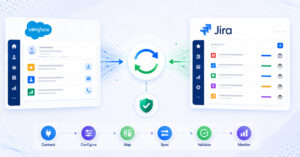
Salesforce captures customer-facing activities while Jira manages engineering execution. Integrating the systems reduces manual handoffs and improves transparency across teams. This guide covers architectural considerations, mapping strategies, and integration best practices.

Blogs

Explore the latest in technology and best practices

Case Studies

Success stories from the field

White Papers

Actionable insights for your business challenges.

Videos

See solutions in action

EBooks

Learn, plan, and execute with confidence

Press Releases

Official announcements and updates

Webinars

Join discussions that drive results

News Letters

Stay ahead with curated insights

Compare-2.png

Compare

See side by side comparison

Aras IBM DOORS Integration

Bi-directional sync using OpsHub Integration Manager

OpsHub Integration Manager (OIM) ensures real-time, bi-directional sync between Aras Innovator and IBM DOORS, enabling seamless collaboration, traceability, and 100% data integrity.

Sign Up for a Free Trial!

Aras – IBM DOORS Integration Overview

Building and managing complex products can be made easier by having a robust digital thread – a seamless flow of data that connects requirements, designs, and processes across the product lifecycle. Without this, information often remains in silos, disturbing traceability and collaboration.

OIM helps in creating a fully automated digital thread by creating a real-time, bi-directional sync between IBM DOORS and Aras Innovator. This integration ensures updates to requirements or designs are instantly reflected across teams and systems, enabling end-to-end traceability, reducing errors, and streamlining workflows.

How Aras – IBM DOORS integration is beneficial for an enterprise

Connecting requirements with the design and development teams for seamless collaboration.

Automatically updating processes across systems whenever there is a requirement change.

Reducing any errors or duplication of data by synchronizing two tools.

Real-time visibility into requirements and product processes for improved decison making.

How OpsHub Integration Manager integrates Aras and DOORS

OpsHub Integration Manager integrates Aras and IBM DOORS (Both DOORS and IBM DOORS Next Generation) bidirectionally. It ensures that all historical and current data is available to each user, in that user’s preferred system, with full context, in real-time.

All requirements from Aras automatically synchronize to IBM DOORS and all the entities and details associated with the ‘requirement’ synchronize back to Aras.

Aras ibm doors integration

Use case: IBM DOORS Integration with Aras Innovator

Use case: The requirements management team wants to ensure seamless traceability from requirements to product design, development, and manufacturing processes managed in Aras Innovator.

Goal: Allowing project managers and engineers to have real-time visibility into how requirements in IBM DOORS are being implemented directly within Aras Innovator, ensuring alignment across design and manufacturing progress.

Benefits of integration for Aras and IBM Doors users

Aras Users

IBM DOORS Users

How OIM helps build a Digital Thread

Digital thread connects every stage of the product lifecycle and ensures that data flows consistently across teams and systems. OpsHub Integration Manager (OIM), an enterprise-grade data integration platform, builds this interconnected digital thread by integrating tools and breaking down silos.

It eliminates vendor lock-ins, and ensures real-time, bidirectional data flow. This allows organizations to achieve complete traceability of every change, decision, and product component throughout the lifecycle, driving innovation and operational efficiency.

No Vendor Lock-in
OIM provides seamless connectivity with 60+ tools, including ALM, PLM, CAD, and more, allowing businesses to choose and switch tools freely, adapt to changing needs, and avoid dependence on any single vendor.
Get Unmatched Scalability
Supporting both on-premises and cloud deployments, OIM aligns seamlessly with a business’s infrastructure and security needs. It also scales with business requirements and can parallelly sync 1000s of projects without slowing end systems.
Enjoy Rich, 100% Accurate Data
OIM’s ability to preserve historical data helps the team to get a complete view of the project, even when switching tools or systems. It retains links, comments, attachments, in-line content, and any past changes allowing them to work seamlessly without losing context.
Ensure Fail-safe compliance
OpsHub Integration Manager ensures fail-safe compliance by keeping data accurate and consistent across systems. With real-time sync and error-handling, it maintains up-to-date audit trails and traceability, reducing compliance risks.
Configure and Manage with Ease
The software is designed for ease of configuration and use, catering to both technical and non-technical users. It provides an interface for monitoring integration progress, complemented by pre-built connectors and drag-and-drop mapping capabilities.

Get started with your Aras and IBM DOORS integration today!

Frequently Asked Questions

How do you integrate IBM DOORS and Aras Innovator using OpsHub?

Integrating IBM DOORS (including DOORS Next Generation) and Aras Innovator using OpsHub Integration Manager involves connecting both systems via their APIs, selecting which DOORS modules and Aras ItemTypes belong in scope, mapping fields and relationships across both schemas, and starting the sync. OIM runs as a standalone application outside both systems no plugins installed in DOORS or Aras. The visual interface handles field mapping, attribute value translation, criteria-based filtering, and sync direction configuration. This integration is particularly relevant for defense, aerospace, and automotive organizations running requirements management in DOORS alongside PLM in Aras, where traceability between requirements and design items must be maintained without manual updates.


Can OIM maintain requirements traceability between IBM DOORS and Aras?

Yes. OIM syncs requirements from IBM DOORS to corresponding items in Aras Innovator while maintaining the relationship links and traceability that regulated industries require. When a requirement changes in DOORS, the linked Aras item reflects it in real time, and the change is recorded. OIM supports field change tracking written as comments in the target system, giving engineering teams a running log of every requirement update without switching between tools. Reconciliation ensures the two systems stay aligned over time, and conflict detection flags situations where both sides are updated simultaneously. 

Can IBM DOORS and Aras be synced bidirectionally?

Yes. OpsHub Integration Manager supports bidirectional sync between IBM DOORS and Aras Innovator. Requirements changes in DOORS flow to Aras, and design or engineering changes in Aras flow back to DOORS. You can also set different sync directions at the individual field level some attributes flowing one way while others flow both ways. Criteria-based sync controls which records enter scope, so only the requirements or items matching your filters are included. 

What are the best tools for integrating IBM DOORS with PLM systems?

For integrating IBM DOORS with PLM systems like Aras Innovator, the options include OpsHub Integration Manager (OIM), custom OSLC-based builds, and point-to-point API integrations. OIM differentiates by offering a purpose-built connector for DOORS (including DOORS Next Generation) that syncs requirements, attributes, relationships, comments, and attachments with full data fidelity all through a visual interface without custom development. OIM runs outside both systems as a standalone application, handles reconciliation and conflict detection automatically, and supports on-premise deployment for organizations with data classification or air-gapped environments. Custom OSLC builds offer flexibility but require development resources and ongoing maintenance. 

Does OIM sync comments and attachments between IBM DOORS and Aras?

Yes. OIM syncs comments with the original author’s name and timestamp preserved. Attachments sync as actual files, not links. When an attribute value changes on one side, OIM can write that change as a comment in the target system, giving both requirements and design teams a running changelog of what changed and when. This is particularly valuable in regulated industries where traceability and change documentation are audit requirements.

Is OIM suitable for defense and aerospace organizations integrating DOORS and Aras?

Yes. OIM is used by defense and aerospace organizations including Airbus, NASA, SAIC, and Northrop Grumman. For DOORS-Aras integration specifically, OIM supports on-premise deployment so data never leaves your infrastructure critical for organizations handling ITAR-controlled or classified data. Role-based access controls keep permissions tight. Audit logs provide a complete record of every sync event. OIM also supports air-gapped deployment for environments with no external network connectivity. The federated integration approach connecting existing tools without replacing them aligns with how defense organizations operate.

Can IBM DOORS and Aras be integrated without custom development?

Yes. OpsHub Integration Manager delivers the full DOORS-Aras integration through a visual interface. Field mapping, attribute value translation, criteria-based filters, relationship mapping, and sync direction are all configured without writing code. This is a significant advantage over custom OSLC integrations or point-to-point API builds, which require development resources and ongoing maintenance. OIM handles reconciliation, conflict detection, and retry logic automatically.

Does DOORS-Aras integration affect system performance?

No. OIM runs as a standalone application outside both IBM DOORS and Aras Innovator. It calls their APIs externally rather than installing plugins inside either system. Sync load never competes with your users for system resources. As sync volume grows, OIM scales independently. You choose where OIM runs your own servers, private cloud, or OpsHub-hosted.

What happens if DOORS or Aras goes down during a sync?

OIM queues every update that could not be delivered and retries automatically when the system comes back in the original order, with no data lost. Conflict detection flags situations where both sides changed at the same time. Reconciliation runs ensure the two systems stay in alignment over time, catching and correcting any drift. Full audit logs record every sync event, retry, and resolution. 

Does OIM support DOORS Next Generation (DNG) in addition to classic DOORS?

Yes. OpsHub Integration Manager supports both IBM DOORS (classic) and DOORS Next Generation (DNG). The connector handles the different API architectures of classic DOORS and DNG, so the migration path from classic DOORS to DNG does not require rebuilding your Aras integration. OIM connects to both versions via their respective APIs from a standalone deployment no plugins installed inside either DOORS version or Aras Innovator.