OpsHub Integration Manager

No-code integration platform for rich bi-directional sync

OpsHub Migration Manager

Zero downtime migration to tool of your choice

OpsHub Archive Manager

Keep Historical Data, Without Slowing Down Your Tools

OpsHub Migrator for Microsoft Azure DevOps

Migrate or restructure Azure DevOps Instances

OpsHub Data Bridge

Real-time, context-rich data lake for AI or analytics

Discover our story, vision, and impact.

By Domain

Software Development & Agile Engineering

No-code integration across teams & systems

IT Service Management & Customer Support

Enable collaboration between IT, support & business teams

Product Lifecycle Management & Systems Engineering

Connect PLM & engineering teams for smarter products

Requirements Management for Regulated Industries

Ensure regulatory compliance from start to release

Blogs

Explore the latest in technology and best practices

Case Studies

Success stories from the field

White Papers

Actionable insights for your business challenges.

Videos

See solutions in action

EBooks

Learn, plan, and execute with confidence

Press Releases

Official announcements and updates

Webinars

Join discussions that drive results

News Letters

Stay ahead with curated insights

Blog

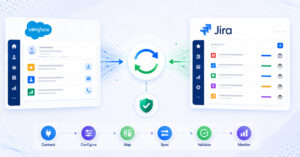
How to integrate Salesforce and Jira in 2026(A step-by-step guide)

Salesforce captures customer-facing activities while Jira manages engineering execution. Integrating the systems reduces manual handoffs and improves transparency across teams. This guide covers architectural considerations, mapping strategies, and integration best practices.

Blogs

Explore the latest in technology and best practices

Case Studies

Success stories from the field

White Papers

Actionable insights for your business challenges.

Videos

See solutions in action

EBooks

Learn, plan, and execute with confidence

Press Releases

Official announcements and updates

Webinars

Join discussions that drive results

News Letters

Stay ahead with curated insights

Compare-2.png

Compare

See side by side comparison

OpsHub Integration Manager

Bi-Directional Tricentis qTest and Azure DevOps Integration

Link test management and development execution with two-way sync between Tricentis qTest and Azure DevOps. No manual updates. No lost test context. QA and development teams stay aligned with full visibility.

Request a Demo

Bridge testing and development without manual work

QA teams manage test cases, test executions, and defect tracking in Tricentis qTest. Development teams run sprints and track work items in Azure DevOps. When these systems stay disconnected, test data gets copied manually, execution context disappears, and quality decisions happen without complete information.

OpsHub Integration Manager connects qTest and Azure DevOps with automatic two-way sync. Test cases sync to Azure DevOps work items. Defects appear in Azure DevOps with full execution context. Development progress flows back to qTest automatically. Test steps, execution results, comments, files, and links move together. Teams work in their own tools while staying completely synchronized.

Trusted by the world’s leading enterprises

Why Companies of All Sizes Love OpsHub

API-based integration, no plugins needed

Integration runs outside qTest and Azure DevOps using secure APIs. Nothing installs inside either system. Systems stay fast and stable without plugin maintenance or performance slowdowns.

High data fidelity integration

Most integrations only sync titles, status, and basic fields. OpsHub syncs complete context including test steps, execution logs, comments, attachments, mentions, relationships, history, and traceability links. Teams see the full picture in both systems without missing details.

No-code setup with built-in reliability

Set up integration through a visual interface without writing code. Save configurations as templates for reuse. Built-in conflict resolution and error recovery keep sync running smoothly. Smart API throttling prevents system overload from qTest and Azure DevOps rate limits.

What happens when qTest and Azure DevOps stay disconnected

How the qTest and Azure DevOps integration works

OpsHub Integration Manager acts as a centralized integration hub connecting Tricentis qTest and Azure DevOps while preserving complete testing and development context across both systems.

qTest → Azure DevOps

Defects, requirements, test cases, test runs, test suites, test cycles, releases, and modules sync to Azure DevOps as work items, user stories, tasks, and bugs along with test steps, execution logs, comments, attachments, screenshots, and traceability links. Development teams receive complete testing context directly in their backlog.

Azure DevOps → qTest

Work items, user stories, tasks, bugs, sprint updates, developer comments, and resolution notes sync back to qTest automatically. QA teams stay informed about development progress without manual follow-ups.

Unlike plugins, OpsHub runs externally through secure APIs, avoiding performance issues, upgrading risks, and plugin maintenance. It supports custom fields, multiple Azure DevOps projects, state transitions, test step sync, and API rate limits automatically.

The result: QA teams track defect progress across development cycles; developers receive complete testing context, and managers get real-time traceability between tests, defects, sprint work, and releases without manual reporting.


Steps to integrate qTest and Azure DevOps

01

Step

Configure Tricentis qTest and Azure DevOps connections
02

Step

Select projects and entities to be synchronized

03

Step

Define sync direction and filters 

04

Step

Map fields and activate synchronization

qTest and Azure DevOps working together

Problem Statement

Test management lives in qTest with detailed test cases, execution cycles, and defect tracking. Development execution happens in Azure DevOps with sprint planning and work item tracking. Test context does not reach developers, and development status does not reach QA. Manual coordination fills the gaps.



Goal

Systems share information automatically. QA and development teams see each other’s progress without copying data manually.

Scenario

Both teams work in their own platforms while data stays consistent and traceable.

Benefits of Integration for qTest and Azure DevOps users

QA teams in qTest

Development teams in Azure DevOps

Business value offered numbers

Better Resource
Utilization

0%

Increase in
Customer Satisfaction

0%

Growth in SLA
Turnaround Time

0%

Get Started with your integration today!

Integrate Tricentis qTest with these connectors

Integrate Azure DevOps with these connectors