Migrating to Azure DevOps is rarely just a technical upgrade. For most organizations, it is an opportunity to modernize engineering practices, clean up years of customization debt, standardize workflows, and give teams a more reliable, cloud-ready platform.
But let’s be honest. Azure DevOps migrations can get messy if not planned with care.
At OpsHub, we have helped teams transition from TFS and on-prem Azure DevOps Server environments to a modern, cloud-ready Azure DevOps Services setup.
These efforts often involve multiple requirements such as CI/CD pipeline migration, test plan migration, requirements and test case migration, identity and permissions migration, and preservation of work item hierarchy. Tools like OpsHub Migrator for Microsoft Azure DevOps (OM4ADO) help automate and streamline much of this effort while keeping engineering processes running smoothly.
Across industries such as healthcare, manufacturing, pharma, software, and federal, the same patterns repeat. The organizations that succeed are the ones that slow down early, ask the right questions, and plan for the things that usually get overlooked.
This guide captures the top considerations you must get right to ensure your Azure DevOps migration, whether TFS to Azure DevOps migration or a cross-organization Azure DevOps migration, is smooth, predictable, and successful.
Let’s dive in.
1. Understand Your Current State Before You Touch Anything
A successful Azure DevOps project migration begins long before you run the first tool or script.
You need a clear understanding of:
- how your teams use work items
- how your process templates evolved over time
- what custom fields and rules you have added
- which repositories are active
- how pipelines are structured
- how identities and permissions are managed
Think of this as mapping your engineering DNA.
Example
We once worked with a financial services customer who had 11 process templates, all forked from the original TFS Agile template over a decade. Each team added its own custom fields, rules, and states. No two projects behaved alike. Once mapped, we realized that only seven fields truly mattered to the business. The rest were historical artifacts.
By analyzing before migrating, they avoided pushing unnecessary complexity into Azure DevOps and started fresh with a cleaner process model.
Takeaway
You cannot migrate what you do not understand. Spend the time to audit your current setup.
2. Normalize and Simplify Your Process Model
Azure DevOps Services uses inherited processes that are easier to maintain but require structure. This means:
- unnecessary customizations must be removed
- states must be streamlined
- global rules should be revisited
- fields need rationalization
- workflows should reflect how teams work today
If you migrate an outdated, complicated process model, frustration will show up on Day 1.
Example
A healthcare customer had a “Testing Complete” state used only by one team. Nobody could explain why it existed. We removed it, simplified the workflow, and the team appreciated that the process finally reflected reality.
Takeaway
Migration is your chance to modernize, not replicate chaos.
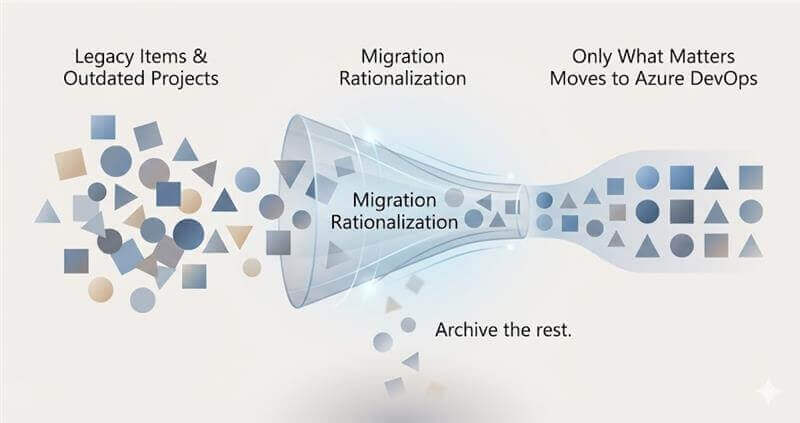
3. Decide What You Want to Migrate and What You Should Not
Not everything in your on-prem environment deserves to move to Azure DevOps.
You must separate:
- Active projects
- Critical artifacts
- Data that needs archiving
- Dead projects
Intentional selection saves time, reduces rework, and keeps your new ADO environment focused.
Example
One customer had more than 350 TFS projects. After a rationalization exercise, only 90 were migrated. The rest were archived in read-only form, which saved months of migration effort.
Takeaway
A migration is a spring cleaning exercise. Do not carry dead weight into the cloud.
4. Pipelines, Repos, and Test Plans in Migration
While work items are often the focus, repositories, pipelines, and test plans are also important parts of an Azure DevOps migration strategy.
Repos
If you are migrating TFVC, it does not map neatly into Git. You may need to revisit:
- branch history
- labels
- folder structure
If you are already on Git, review:
- Branch protection policies
- LFS usage
- Repository size and sprawl
Pipelines
Classic Build and Release pipelines may not run as-is. Migration is a natural point to modernize them into YAML and align with ALM modernization and DevOps transformation goals.
Test Plans
Test plans include many components such as Test Suites, Test Points, and Shared Steps. These do not always migrate cleanly without the right tooling.
Example
A manufacturing customer discovered that their pipelines referenced on-prem file shares and internal servers. These had to be rewritten for the cloud. Planning early helped them avoid last-minute failures.
Takeaway
Repos, pipelines, and tests are the operational heart of engineering. Treat them with equal importance.
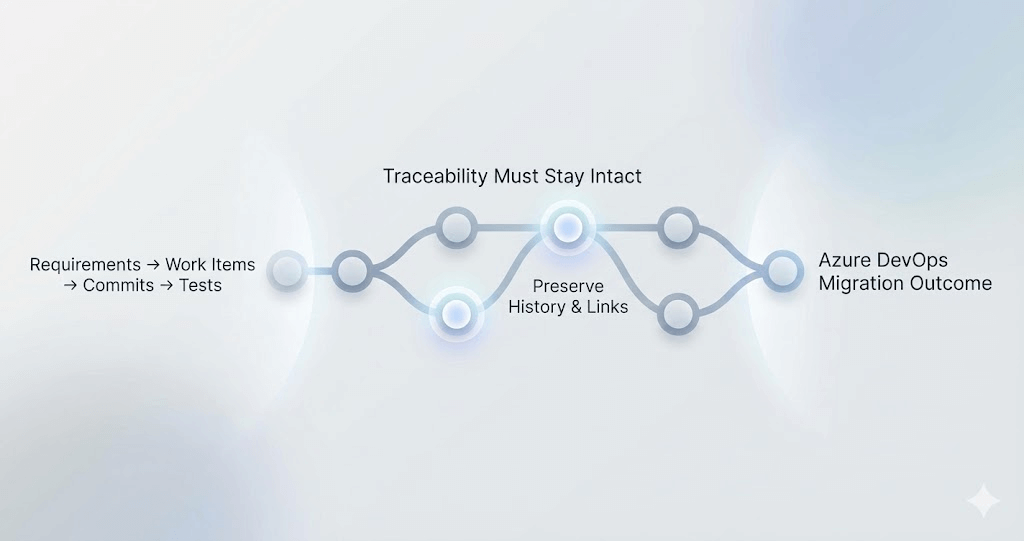
5. Preserve Traceability, Attachments, History, and Links
A migration that preserves just titles and descriptions is worse than no migration.
Teams need:
- parent-child hierarchies
- cross-work-item links
- Git commit associations
- attachments and tags
- area and iteration structures
- historical test results
Most native migration approaches do not fully preserve these elements. Broken links or missing history erode trust in the new environment and jeopardize audits.
Example
A defense contractor required full traceability from requirement to test case to historical test results. With the right tooling, they preserved 100 percent traceability in Azure DevOps.
Takeaway
A migration must be complete, accurate, and auditable.
6. Test Your Migration in Iterations Instead of a Big Bang
A smooth Azure DevOps project migration is always iterative.
- Run a pilot migration
- Validate fidelity
- Identify mismatches
- Tune the mapping
- Re-run
- Scale to more data
- Cut over when ready
Organizations that do this well perform two to three dry runs before the final migration.
Example
A global tech company performed seven test runs for one of their projects. By the final cutover, they achieved more than 99.5 percent fidelity with zero user complaints.
Takeaway
Treat migration as a repeatable, testable process, not a one-day event.
Bringing It All Together
A smooth Azure DevOps migration requires clear understanding, cleanup, identity alignment, intentional scoping, careful pipeline and repo planning, full traceability preservation, and multiple test runs.
Do these well, and your teams will not just move to Azure DevOps. They will thrive on it.