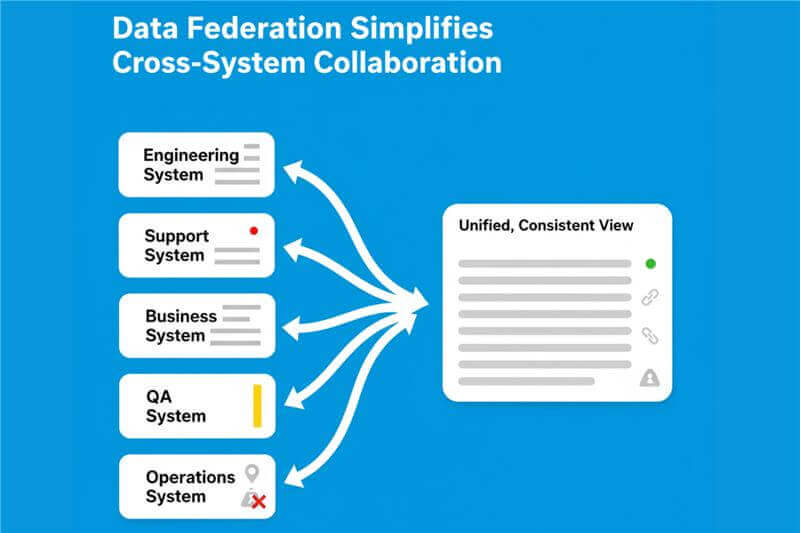
Most teams do not wake up one day and say, “Let’s implement data federation.”
They need it because work naturally ends up distributed across multiple systems, and those systems rarely communicate well.
Federation solves a very human problem:
People want to work where they are most productive without losing context or breaking collaboration.
Let’s break this down with real examples.
Why do Enterprises need Data Federation?
Teams use different tools for valid reasons, but the work is still connected
In large enterprises:
- Development teams use Jira
- Operations teams use ServiceNow
- QA teams work in Tosca or Tricentis
- Business and PMO teams use Azure DevOps or Salesforce
Each tool is the right choice for that function. The moment work spans functions, friction begins.
Example
- A defect found in Tosca must be fixed in Jira and tracked as an incident in ServiceNow.
- Without data federation, teams copy IDs, retype updates, chase each other on Slack, and lose context.
- With data federation, the defect, story, and incident remain linked and updated in real time across all systems.
Federation eliminates manual re-entry, which is slow and error prone
When systems are isolated, people become the integration layer.
Example
- A customer escalation enters Salesforce.
- Support creates a Jira ticket manually.
- Engineering updates the Jira ticket, but support sees nothing unless they check manually.
- Sales has no visibility into deployment status.
With data federation:
- Salesforce Case ↔ Jira Issue stay synced
- Status, comments, attachments, and priorities flow automatically
- No manual updates and no duplicated work
Federation preserves end to end context
Enterprises cannot afford gaps in audit trails, requirement chains, or defect histories.
Example
To complete an audit, a company needs to trace:
- Which requirement generated which test case
- Which test case failed
- Which defect was logged
- When it was fixed
- How it impacted a release
This chain may span ServiceNow → Azure DevOps → Tosca → Jira.
Without federation, the story breaks.
Federation keeps relationships, references, and updates intact across all systems.
It prevents operational slowdowns during tool changes
During migrations or modernization initiatives, companies operate in hybrid environments
Example: Jira Data Center to Jira Cloud migration
- Engineering moves to Cloud
- Support, Ops, and QA remain on Data Center for weeks or months
- All still need to collaborate in real time
Federation ensures both systems stay in sync without downtime, stalls, or broken workflows.
It keeps each system’s source of truth accurate
Tools disagree by design. They use different:
- States
- Priorities
- Required fields
- Workflows
- User identities
Federation is not just syncing. It is translation.
Example
- A “Critical Incident” in ServiceNow must map to a “P1 Bug” in Jira
- “Ready to Test” in Azure DevOps may correspond to “In QA” in Jira
Federation ensures each system stays accurate in its own terminology.
It scales collaboration without forcing tool standardization
Enterprise tool landscapes are diverse due to legacy systems, acquisitions, and functional needs.
Federation says:
You do not need to force everyone into one tool. Collaboration can be system neutral.
Example
A medical device company may use:
- Jira for software
- SAP for manufacturing
- PLM tools for product design
- Tosca for testing
- ServiceNow for ITSM
Product lifecycle work crosses all these systems.
Data federation keeps them aligned without re platforming.
It improves customer experience indirectly
When internal teams communicate better, customers benefit.
Example
- A bank receives customer complaints in ServiceNow.
- Engineering works in Jira.
- Business teams operate in Salesforce.
With data federation:
- Support sees engineering progress
- Engineering sees customer urgency
- Business sees resolution timelines
Customers receive faster and more accurate updates.
People need data federation because work is distributed while outcomes are shared. Federation stitches systems together so teams can collaborate without changing tools, losing context, or relying on manual updates.
Key Challenges of Data Federation
1. Aligning data models that were never built to match
ServiceNow has Incidents, Problems, Changes.
Jira has Stories, Bugs, Epics.
ADO has PBIs, Tasks, Bugs.
Before syncing anything, teams must define:
- State mapping
- Priority mapping
- Relationship mapping
- Field ownership
This takes human alignment, not technology.
2. Maintaining referential integrity as systems evolve
Systems change constantly:
- Jira projects merge
- ServiceNow states are reconfigured
- Release environments are renamed
These changes can break references or cause update loops unless there is strong governance.
3. Handling conflicts and ownership decisions
When two systems disagree, who wins?
Federation requires rules for:
- Field ownership
- Conflict resolution
- Update throttling
- Handling partial failures
Without this, syncs become unpredictable.
The Best Way to Implement Data Federation in an Enterprise
Federation is not a point to point sync. It is an operating model.
Three principles matter most.
1. Define the source of truth before connecting anything
Federation fails when systems fight for control.
Define:
- Which system owns each entity
- Which system owns each field
- How relationships flow
Example
ServiceNow Incident ↔ Jira Bug
- ServiceNow owns severity and customer impact
- Jira owns status, assignment, fix version
- Comments sync both ways
- Attachments sync one direction
Clear ownership prevents loops and conflicts.
2. Normalize the data models so each system stays authentic
Normalization allows systems to stay correct while interoperating.
This requires:
- Workflow mapping
- State normalization
- Identity mapping
- Reference translation
This is translation, not duplication.
3. Use a purpose-built federation layer, not point to point integrations
Point to point integrations break at scale.
A federation layer must:
- Resolve conflicts
- Enforce field ownership
- Guarantee referential integrity
- Scale to thousands of updates per hour
- Provide auditability
- Maintain data contracts
- Offer monitoring and governance
This is where OpsHub Integration Manager (OIM) becomes essential.
Why OpsHub Integration Manager OIM is the right federation solution
OIM acts as the enterprise federation layer by providing:
- Real time bi-directional synchronization across dozens of systems
- Conflict resolution and ownership rules
- Automated data transformation and normalization
- Guaranteed referential integrity
- High scale performance
- Deep mappings for tools like Jira, ServiceNow, Salesforce, Azure DevOps, Tosca, Rally, MicroFocus, and more
- Enterprise grade governance, observability, and error handling
Instead of a fragile mesh of connections, OIM serves as the central data federation backbone for the enterprise.
Putting it all together
Effective data federation requires three layers:
A. Governance Layer
Defines ownership, lifecycle, and how changes propagate.
B. Data Contract and Transformation Layer
Defines mappings, normalization, and conflict rules.
C. Federation Technology Layer
Executes reliable, real time synchronization at scale. OpsHub Integration Manager OIM operates in this layer.
Think of it this way
Data federation is like live translation at the UN:
- Each speaker uses their own language
- A translator normalizes meaning
- A protocol defines precedence
- A control room ensures nothing breaks mid session
Without rules, ownership, and a control room, there is chaos.
Conclusion
When systems stay connected, teams move faster and decisions become easier. To see how data federation could work in your enterprise, talk to an OpsHub expert about implementing it with OpsHub Integration Manager.