Introduction
The integration between requirements management and verification management tools has become crucial in the fast-paced world of semiconductor development. By bridging the gap between requirements and development, companies can ensure that every aspect of the semiconductor product is verified against its intended design and performance criteria. This integration has led to a significant reduction in the risk of costly reworks and delays.
The Need for Integration
Customers today want a quality product, faster delivery, and a seamless experience throughout their journey. Therefore, organizations do everything possible to accelerate their time-to-market without compromising product quality. The first step towards this endeavor is creating a unified ecosystem by bringing all tools and teams together using an integration solution. Eliminating the time-consuming manual collaboration process that leads to delays and sub-optimal decisions because teams do not have full context is crucial.
Common Challenges in Verification Management
These challenges can result in extended development timelines as teams struggle to identify and address gaps in verification coverage. Moreover, the impact on product quality can be substantial. Insufficiently verified designs may result in issues that remain undetected until late in the development cycle or even after product release, leading to increased development costs and time and potential erosion of customer confidence and a company’s reputation.
Cadence Verisium Manager and Requirements Management Integration Using OpsHub Integration Manager
OpsHub Integration Manager (OIM) is a leading enterprise-grade data integration software.
OIM addresses the common dilemma of prioritizing either collaboration or functionality. By providing real-time, bi-directional data synchronization and a centralized platform for monitoring integration progress, OIM offers both. This enables teams to maintain their existing best-of-breed systems while seamlessly integrating them for enhanced transparency and information exchange. Additionally, OIM’s audit trail and traceability features ensure accountability and compliance.
How requirements management teams benefit from choosing OIM:
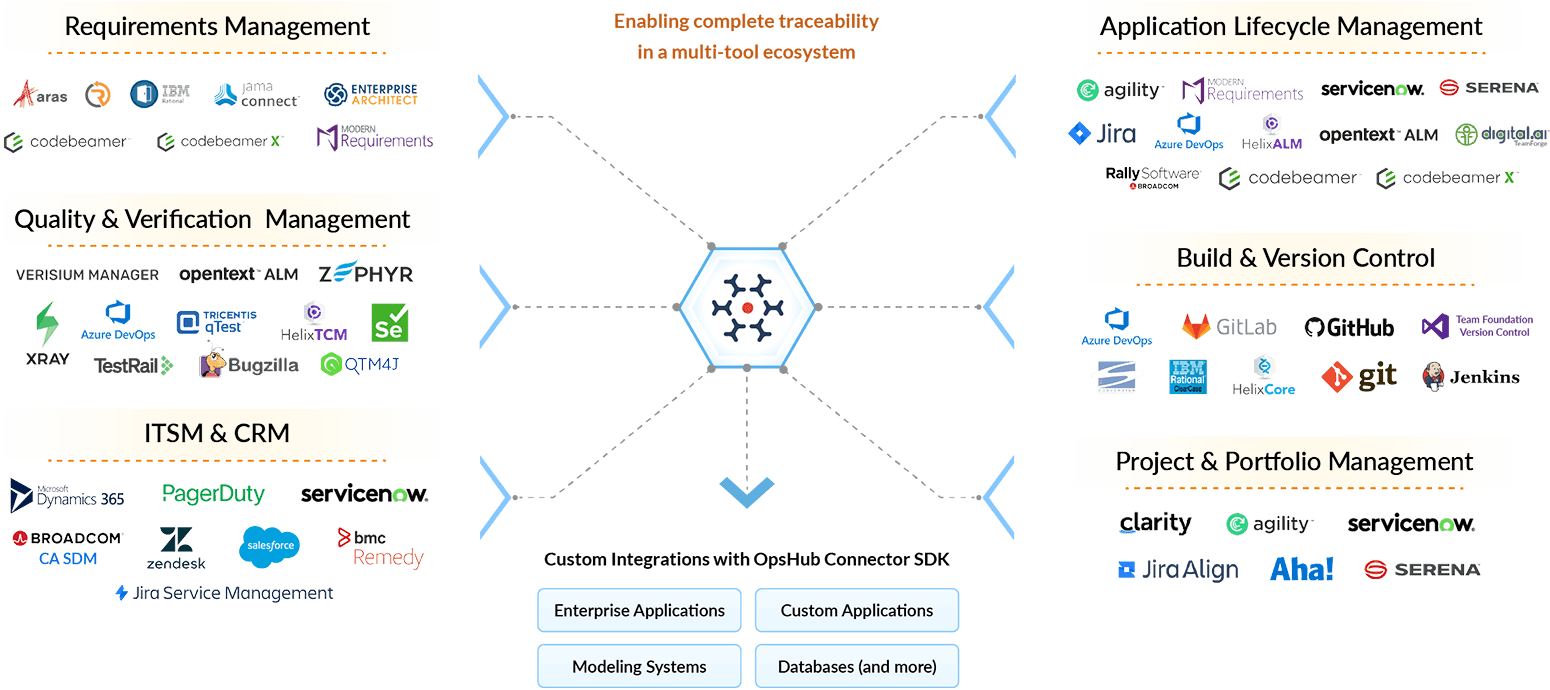
With OpsHub Integration Manager, you can integrate Cadence Verisium Manager with:
Let's Get Down to Process: OpsHub Integration Manager Offers-
You can watch the integration video here.
Commonly synchronized entities between Cadence Verisium Manager and Jama Connect
To set up the Verisium Manager – Jama Connect Integration, a 3-step process is outlined, which you can also access through this video link.
Step 1: Configuring the Systems onto OIM
To create a new integration, navigate to the integrations page and click on the + sign. Add an integration name and the systems to this integration.
Step 1.1: Configuring Verisium Manager System
Give a unique system name and add other mandatory details like server URL, username, and user password. Switch the toggle to the right to enable the HTTPS certificate of the Verisium Manager server. Save all the details to configure the system. Once configured, OIM will fetch the projects dynamically in that system.
Step 1.2: Configuring the Jama Connect System
Add details to configure Jama Connect. Give a unique system name followed by other mandatory details like server URL, username, and user password. Since we are selecting the authentication type as Basic, we need to fill in the username and password of the integration user.
Now that the system is configured, all the associated projects load dynamically.
Step 2: Mapping Configuration
Step 2.1: Mapping projects
Select the projects to sync. Multiple projects between the two systems can be synced. We can map one project from Jama Connect to multiple vPlans in Verusium Manager and multiple vPlans from Verisium Manager to one project in Jama Connect. Here, systems and projects can be integrated in 3 directions, i.e., forward, bidirectional, and backward. Select the bidirectional arrow to sync the projects bidirectionally.
Step 2.2: Mapping Entities
1. Select the entities to create a mapping between the systems. Other entities like Metric Ports from Verisium Manager to Jama Connect as Test Case, among others, can be mapped.
2. Click on Add Mapping which will navigate you to Create Mapping page. Here, we can see the basic details of the system, including the project and entity type. There are 2 ways to create Mapping, i.e., Create from Scratch or Automap. Automap allows OIM to map fields with similar names automatically.
3. Here, Selecting Create from Scratch option to create the Mapping. First, map the mandatory fields, i.e., Name in Verisium Manager to Name in Jama Connect. Add some more fields to be integrated, like Priority, Status, and Description.
Here are a few examples of the value and mandatory field mapping configuration:
Note: Here, in the Value Mapping, the values are mapped in the bidirectional mode. You can change the direction as per your requirements.
Once all the details are configured, click Create Mapping to complete the step. The Mapping is successfully created.
Step 3: Activate the Integration
Save and activate the integration by switching the toggle to the right, navigating to the integrations page again. Here, the integration between Verisium Manager and Jama Connect will be created. The integration can also be activated by clicking the “Activate All” option.
Conclusion
Adopting a requirements management tool and integrating it with Cadence Verisium Manager marks a substantial advancement in semiconductor verification processes. Navigating the intricacies of contemporary semiconductor design highlights the crucial need for a unified approach between requirements management and verification management tools. This collaboration is not merely beneficial; it is fundamental for the evolution of design verification strategies.