Why managing multiple Azure DevOps instances become a problem
If your organization scaled through acquisitions or distributed teams, you’re probably dealing with:
- No single source of truth
Scattered data and duplicate reporting lead to inconsistent insights and poor decision-making. - Broken cross-team visibility
Siloed work items, code, and pipelines slow collaboration and cause missed dependencies. - Traceability gaps → Compliance risk
Lost end-to-end traceability makes audits manual, time-consuming, and error-prone. - Reporting chaos
Multiple systems create conflicting metrics with no reliable performance view. - Rising costs & overhead
Redundant ADO instances increase licensing, maintenance, and admin effort.
You don’t have a system. You have a collection of “almost accurate truths.”
What makes Azure DevOps migrations so risky?
- Loss of history – comments, revisions, and status updates can disappear during poorly handled migrations, making it hard for future teams to understand why decisions were made.
- Broken relationships – links between tasks (parent-child), dependencies across teams, and connections between requirements and tests can break, cutting off important traceability.
- Disruption to ongoing work – if teams are still working in the old system, migrations without proper sync can create duplicate items and conflicts between systems.
- Compliance risks – if full audit history isn’t preserved, organizations may fail to meet regulatory requirements or prove traceability when needed.
Key migration considerations (before you touch anything)
- Define the post merge structure
Decide how projects, teams and area/iteration paths will look in the target organization. Over‑flattening structures to simplify migration often introduces permission nightmares later.
- Align processes and templates
Standardize work‑item types across instances and map custom fields carefully. Inconsistent processes create friction and can block migrations
- Understand Dependencies
Don’t migrate work items in isolation. Pipelines depend on repositories; releases depend on builds; dashboards depend on test results. Break one link and your CI/CD pipeline collapses “like a badly written script.”
Why traditional migration approaches fail
How to merge Azure DevOps instances (step-by-step)
Merging Azure DevOps instances is more than just exporting data from one place and importing it into another. You need to preserve every work item’s history, relationships, permissions, and even the meaning of the data—while keeping teams productive throughout.
Here’s how you can connect multiple Azure DevOps instances using OM4ADO.
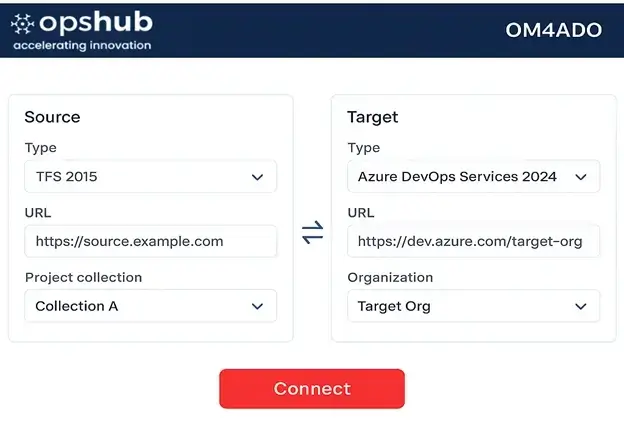
Step 1: Connect your source and target environments
Start by securely connecting both your source (e.g., TFS, ADO Server, or another ADO Services instance) and target Azure DevOps environment.
OM4ADO supports:
- Cross-version compatibility — from TFS 2010 to Azure DevOps Services 2024
- Multiple project collections or organizations
- Hybrid setups involving both on-prem and cloud environments
Step 2: Define what you want to migrate
Next, choose exactly what needs to move. This isn’t a bulk dump, it’s controlled, selective, and intelligent.
You can migrate:
- Work items (with full history, links, and attachments)
- Test entities (test plans, suites, runs, results)
- Pipelines (build and release definitions)
- TFVC/Git repos with commit history
- Queries, dashboards, area/iteration paths
- User access settings and permissions
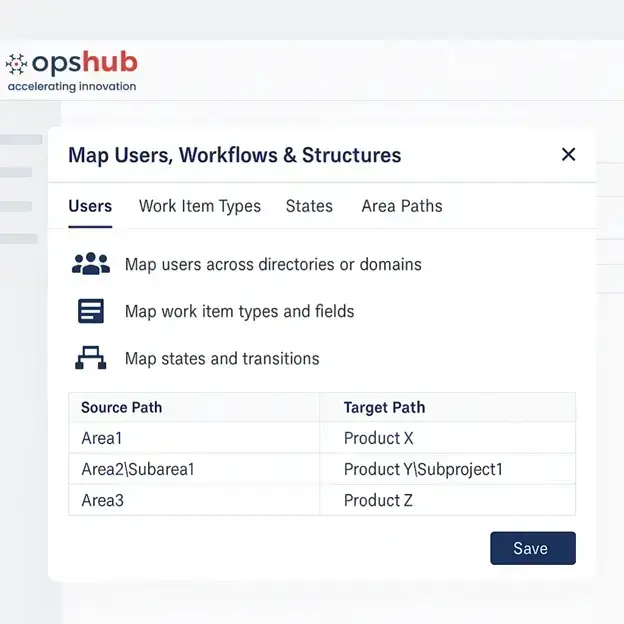
Step 3: Map users, workflows & structures
Merging only works if things make sense on the other side.
Step 4: Initiate migration with full context preservation
Once everything’s mapped, kick off the migration.
This is where OM4ADO shines. It ensures:
- All work items retain their IDs, links, attachments, comments, and change history
- Hierarchies and relationships (parent-child, related, tested by, etc.) are preserved
- Test results, parameters, and runs are migrated as-is
- Pipelines and variables are reconnected and ready-to-use
No dependency is broken mid-migration
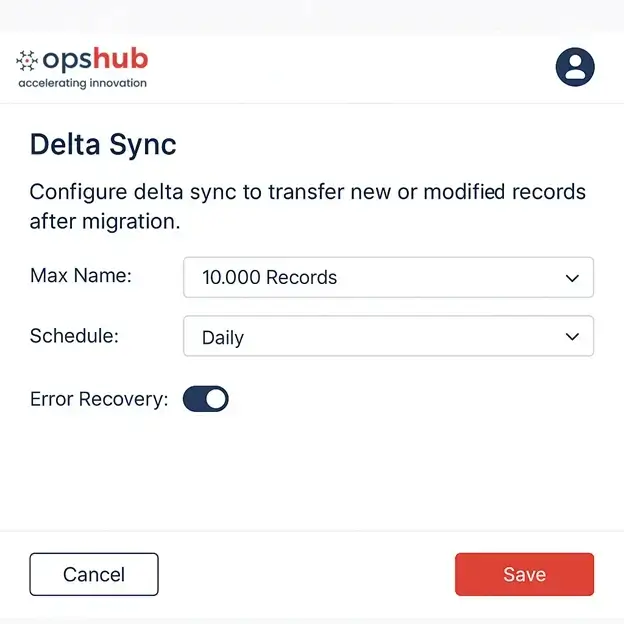
Step 5: Sync ongoing changes with delta & reverse sync
Migrations take time, especially when large projects or distributed teams are involved. That’s why OM4ADO includes:
Step 6: Validate & cut over with confidence
Once migration is completed, OM4ADO:
- Runs automated data validation to ensure nothing is missed
- Highlights discrepancies for manual review (if needed)
- Supports side-by-side comparisons of source and target
You can cut over when you’re ready – confident that everything moved correctly and that your teams won’t be chasing issues post-migration.
Merging Azure DevOps isn’t just a ‘tech task.’ It’s the foundation where the digital thread of your organization rests. One wrong move, and you lose years of audit trails, test history, and team trust.
You need more than scripts and wishful thinking. You need a purpose-built solution.
That’s where an enterprise-grade Azure DevOps migration platform like OpsHub Migrator for Azure DevOps (OM4ADO) comes in.
Why You Need the Right Azure DevOps Migration tool
Migrating Azure DevOps environments manually or with basic tools often leads to broken data, missing context, and operational disruption. At scale, the challenge is not just moving data, but ensuring that everything remains accurate, traceable, and usable after migration.
This is where purpose-built platforms like OpsHub Migrator for Azure DevOps (OM4ADO) become critical.
OM4ADO is designed to handle complex, enterprise-grade migrations while preserving the full context of your engineering data.
What it Enables
- Preserves complete historical context
Full revision history, comments, attachments, and state transitions are retained, making it possible to perform audits, investigations, and root-cause analysis without gaps - Maintains hierarchy and relationships
Parent-child links, dependencies, and connections between work items, test cases, and code remain intact, ensuring end-to-end traceability across the lifecycle - Ensures resilience during migration
Built-in failure detection and retry mechanisms allow migrations to resume from the point of failure without restarting or requiring manual cleanup - Supports compliance and audit readiness
Complete audit trails are preserved, enabling organizations to meet regulatory requirements while maintaining full lifecycle visibility - Handles conflicts in a controlled manner
Detects duplicate or conflicting updates during live synchronization and applies governed resolution rules to prevent data corruption
What this means in practice
- No downtime during migration, allowing teams to continue working
- Continuous synchronization between source and target systems
- No post-migration cleanup or manual reconciliation
- A single, consistent source of truth across systems
- Clean, structured, and governed data from day one
Final take
Merging Azure DevOps instances isn’t just moving data.
It’s rebuilding your digital thread without breaking it.
Do it wrong:
- You lose history
- You break compliance
- You destroy trust
Do it right:
- Everything stays intact
- Teams don’t even notice
If you’re still relying on scripts and hope, that’s… bold.
and see how OM4ADO ensures compliance, continuity, and complete control across complex Azure DevOps environments.
Frequently Asked Questions (FAQs)