Azure DevOps migrations can range from straightforward project moves to complex organization-wide transformations involving years of development history, thousands of users, and multiple interconnected systems. The migration approach an organization chooses can influence project timelines, operational risk, data integrity, and long-term maintainability.
As organizations modernize legacy environments, consolidate development platforms, or adopt cloud-based delivery models, they are often faced with a wide range of migration options. Each approach offers different capabilities, levels of automation, and trade-offs.
This guide examines the leading Azure DevOps migration solutions available in 2026. You’ll learn how different approaches compare, what factors to consider when evaluating migration options, and how to choose the right solution for your organization’s needs
What is an Azure DevOps migrator?
An Azure DevOps migrator is a software solution that is designed to move projects, work items, repositories, pipelines, test assets, and other development data from one environment to another. Its goal is to transfer data accurately while preserving important relationships, history, and traceability.
Depending on the migration requirement, these solutions can support migrations between Azure DevOps organizations, Azure DevOps Server environments, Team Foundation Server (TFS) instances, or other application lifecycle management (ALM) platforms. Their primary purpose is to automate data transfer, reduce migration effort, and improve migration accuracy at scale.
Why organizations need migration tools?
Organizations migrate development environments for many reasons, including cloud adoption, tool consolidation, organizational changes, and modernization initiatives. As the volume and complexity of engineering data grows, manual migration methods become increasingly difficult to manage and validate.
Common migration scenarios include:
- Corporate mergers, acquisitions, or divestitures that require immediate consolidation or splitting of decentralized instances.
- Cloud adoption strategies focused on moving legacy on-premises servers to cloud services to reduce maintenance overhead.
- Large scale cleanups that involve splitting apart oversized project structures or merging active workstreams to standardize governance.
- Selective project migration where specific high-priority teams must be relocated without moving an entire database collection.
Migration solutions help automate data movement, preserve historical information, and reduce the effort required to move projects between systems. They also support validation activities, making it easier to confirm that important project data has been migrated successfully before teams begin working in the new environment.
What data is typically migrated in Azure DevOps projects?
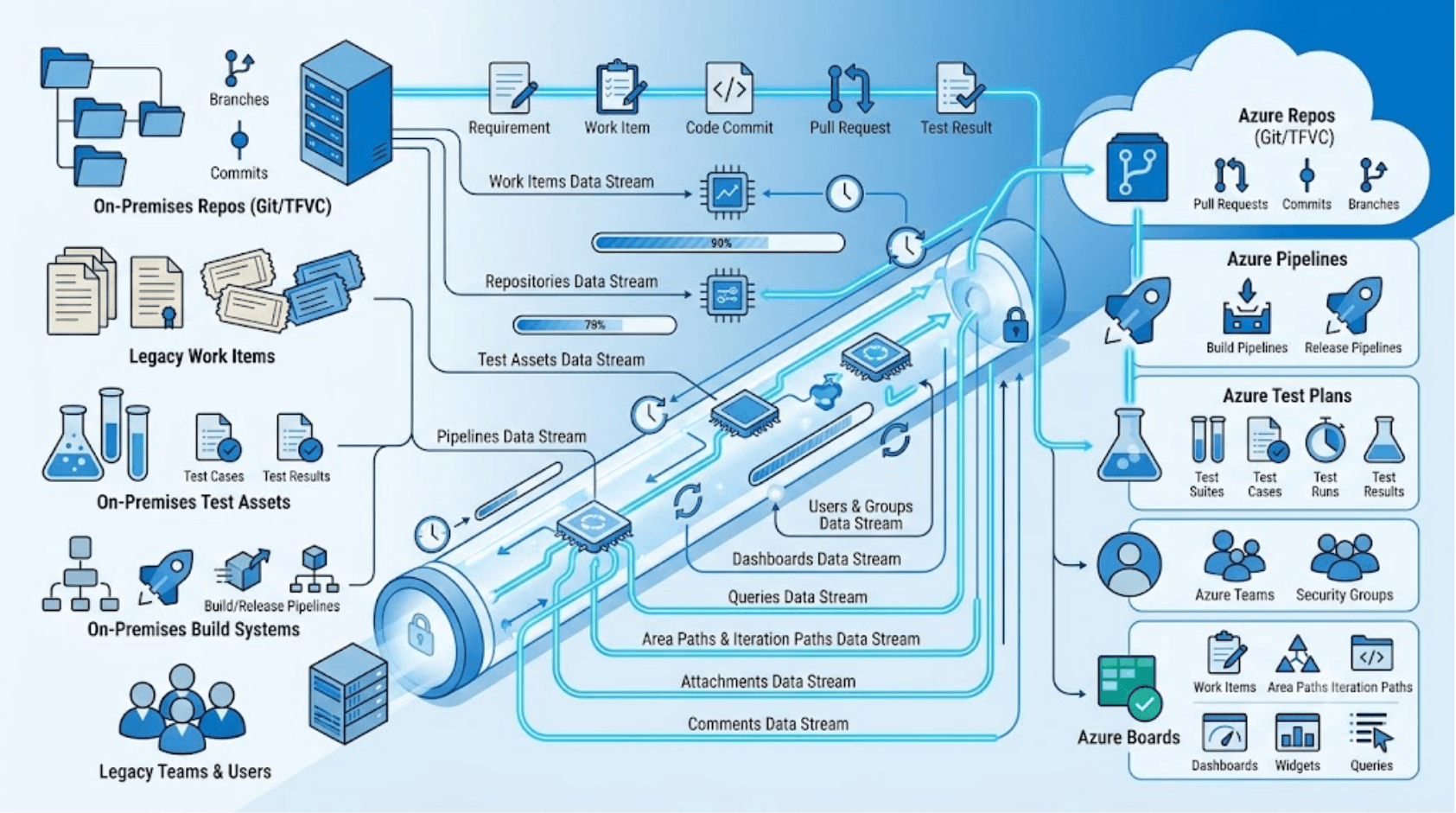
Azure DevOps environments contain much more than work items and source code. Depending on the migration scope, organizations may need to move repositories, pipelines, test assets, users, dashboards, permissions, and years of historical project data. Understanding what can and cannot be migrated, and what must be preserved versus what can be recreated, is essential for scoping a migration effort accurately. The following covers the major data categories and why each presents its own technical considerations.
Work items and their history
Work items are the foundation of project tracking in Azure DevOps. A complete migration should preserve work items, custom fields, comments, attachments, relationships, inline images, user mentions, and revision history, including original authors and timestamps. Organizations may also need to preserve area paths and iteration structures that support planning, reporting, and team-level work management.
TFVC history
For organizations using TFVC, preserving repository history is often just as important as migrating the code itself. A complete migration should retain changesets, branches, labels, comments, and other historical records that provide traceability and context. When TFVC repositories are converted to Git, organizations should also ensure that historical information remains accessible after the migration.
Pipelines
Classic build and release pipelines store their configuration in Azure DevOps, not in the repository. YAML pipelines are stored in the repository itself and migrate with the repo, but their referenced service connections, variable groups, and environment definitions must be recreated or migrated separately. Agent pool references also require remapping when moving between organizations.
Test entities
Test entities includes test plans, test suites, test cases, test steps, test runs, test results, attachments, screenshots, and execution history. A successful migration should preserve both the testing data and the relationships between these entities to maintain testing context, historical evidence, and traceability between requirements, test cases, and test execution results.
Users, teams, groups and permissions
Users, teams, security groups, and permissions play an important role in how Azure DevOps environments operate. During migration, identities often need to be mapped between source and target systems, while permissions and access controls must be recreated to ensure teams can work effectively after migration. Failing to migrate permissions accurately results in either excessive access or blocked workflows on day one after migration.
Pull requests
Pull requests, including their titles, descriptions, reviewer comments, vote histories, and linked work items, represent a significant portion of the code review audit trail. Not all migration tools support PR migration, and those that do must handle the identity mapping challenge because every comment is authored by a specific user.
Dashboards, queries, and project configuration
Many organizations needs dashboards, widgets, shared queries, boards, team settings, notifications, and other project-level configurations to be migrated properly. While these artifacts may not directly contain development data, they play an important role in team productivity and reporting.
Types of Azure DevOps migration approaches in 2026
The primary Azure DevOps migration approaches in 2026 consist of user interface platforms, custom code scripts, direct application endpoints, and file spreadsheet sharing. Choosing among these approaches requires weighing execution speed against data completeness.
Native migration methods are provided by platform vendors to support specific migration scenarios. For Azure DevOps, Microsoft’s migration approach is primarily designed for moving supported Azure DevOps Server and TFS environments to Azure DevOps Services. These methods typically focus on full-environment migrations and follow vendor-defined requirements and limitations.
Guided UI-based migration platforms are purpose-built solutions designed specifically for migration projects. They provide graphical interfaces for configuring, executing, and monitoring migrations, making them easier to manage than script-based approaches. These platforms often include capabilities such as data mapping, validation, error handling, reporting, and migration tracking. They are commonly used for phased migrations, selective project migrations, environment consolidation, and large-scale migration initiatives where visibility, control, and ease of use are important.
Script-based approaches rely on command-line tools, configuration files, and custom scripts to perform migrations. They provide flexibility and control but often require technical expertise to configure, execute, troubleshoot, and maintain. These approaches are commonly used by teams that prefer customization and are comfortable working with scripting and automation.
Spreadsheet methods use flat files to extract work items from a source and upload them to a destination. This approach is highly effective for basic projects with minimal data depth. Its primary drawback is that it drops item links, discards historical timestamps, and completely excludes source repositories or pipelines.
Popular Azure DevOps migration solutions in 2026
Different migration solution offers different capabilities, levels of automation, and migration coverage. Understanding these differences can help organizations choose the approach that best fits their migration requirements.
Here is a comprehensive overview of the best tools built specifically for Azure DevOps migrations:
Microsoft’s native migration approach is primarily used by organizations performing a one-time migration from a supported Team Foundation Server (TFS) or Azure DevOps Server environment to Azure DevOps Services. It follows a collection-level lift-and-shift model that moves an entire project collection as a single unit.
Key Characteristics
- Command-line and scripting-based migration approach.
- Migrates an entire project collection at once.
- Preserves data, history, identities, and system records with complete fidelity.
- Requires the target Azure DevOps organization to be empty before migration.
- Supports recent Azure DevOps Server versions (2022.1 or 2022.2.), so older TFS sources must be upgraded first.
- Source collections typically become read-only during migration activities.
- Primarily supports Azure DevOps Server/TFS to Azure DevOps Services migration scenarios.
- Migration failures typically require database-level recovery and rerun procedures.
OM4ADO is a free UI based migration platform built specifically for Azure DevOps migrations. It is commonly used by organizations that need more flexibility than a traditional lift-and-shift migration, including phased migrations, selective project migrations, consolidation initiatives, and migration programs of any scale.
Key Characteristics
- GUI-based migration setup, configuration, and monitoring.
- Supports full, phased, and selective project migrations.
- Delta migration allows teams to continue working while changes are synchronized to the target environment.
- Preserves work item history, links, relationships, markdown content, traceability, and supported project artifacts.
- Automatically resumes migration from the last successful checkpoint after failure.
- Supports migration of work items, repositories, pipelines, test assets, users, teams, and other supported Azure DevOps entities.
- Supports TFS-to-Azure DevOps, Azure DevOps-to-Azure DevOps, Azure DevOps-to-TFS, and TFS-to-TFS migration scenarios in Pro edition.
- Supports consolidation and project split scenarios in Pro edition.
Planview Hub is a migration and integration platform like OpsHub that supports moving and synchronizing data between Azure DevOps and other application lifecycle management (ALM), Agile, and project management systems. It focuses on connecting systems and moving data across complex tool ecosystems.
Key Characteristics
- GUI-based configuration and administration.
- Supports migration and synchronization of work items, requirements, test cases, test sets, test results, attachments, comments, and relationship links.
- Provides data mapping and transformation capabilities between connected platforms.
- Can support ongoing synchronization in addition to one-time migration activities.
- Designed for environments that use multiple interconnected engineering, Agile, ALM, and project management tools.
- Migration capabilities vary depending on the source and target systems involved.
- Azure DevOps pipelines, release configurations, dashboards, widgets, and certain project-level configurations typically require separate migration or recreation.
- User accounts, teams, security groups, permissions, and saved queries may require separate migration activities.
- TFVC repositories, changesets, Git repositories, and source control history are not migrated as part of the platform.
CSV-based migration is typically used for very small-scale work item migrations, backlog restructuring, and bulk updates where only limited project data needs to be moved between systems.
Key Characteristics
- Spreadsheet-based import and export process.
- Supports bulk creation and update of work items.
- Easy to use for smaller migration projects and backlog restructuring.
- Focused primarily on work item data rather than complete project migration.
- Does not migrate repositories, pipelines, test assets, dashboards, or source control history.
- Limited support for preserving relationships, traceability, and historical context.
- Often requires manual validation and cleanup after import.
How to choose the right migration tool
To choose the right migration tool, you must map out your deployment scope, evaluate your compliance mandates, and verify your system availability requirements. A hasty choice can result in broken pipelines and corrupted historical metadata
When evaluating migration options, consider the following factors:
- Define your exact migration scenario: Decide if your team needs to migrate an entire collection, move a single project, or combine multiple collections.
- Assess total data volume and complexity: Review whether you only need basic text fields or if you must retain nested test suites, code commits, and detailed audit trails.
- Evaluate compliance and traceability requirements: Identify if your industry requires unchanged user fields, original timestamps, and clear validation logs.
- Quantify tolerable downtime: Calculate the business cost of freezing developer access and putting pipelines into a read only state during the transfer.
- Audit internal scripting bandwidth: Check if your team has the available hours to write, test, and debug custom code or if you require an automated UI based solution.
Common mistakes to avoid when selecting migration tools
Procuring free open source utilities or using basic manual spreadsheets to avoid initial licensing fees often drives up total project costs. Internal developers must spend weeks managing layout mismatches, manually rebuilding missing data connections, and fixing errors from text files. The cost of developer delays, idle team sprints, and broken delivery flows is always higher than the cost of a commercial migration license.
Moving project data without running pre migration template checks often results in extensive database errors. When source and target process configurations contain conflicting states, field types, or mandatory properties, the transfer engine will crash or drop information. Skipping template alignment checks before execution creates broken fields that force teams to perform manual cleanups after the cutover.
Treating an application lifecycle database like a flat group of files is a critical mistake. Engineering data relies completely on relationships, connecting text stories to bugs, test scripts to requirements, and code changes to tasks. Selecting a migration path that fails to understand these connections breaks your data lineage and destroys team’s visibility.
Migration approaches that function smoothly during a single project trial can fail completely under heavy production conditions. When forced to process hundreds of thousands of work items, full discussion logs, and complete branch graphs, basic scripts often crash from API rate limiting or system memory exhaustion. Failing to test the migration engine against your complete data volume causes unexpected project delays and extended timeline targets.
Conclusion
There is no single migration approach that fits every organization. The right choice depends on your migration scenario, the type of data that must be preserved, your downtime requirements, and the level of flexibility your team needs throughout the migration process.
Before selecting a migration approach, start by assessing your environment with a Data Discovery Utility to understand your migration scope, identify potential risks, and evaluate the data that needs to be preserved. Early visibility into your environment can help improve planning and reduce migration surprises later in the project. If you’re preparing for a complex migration, speaking with an Azure DevOps migration expert can help you evaluate options, validate requirements, and build a migration plan tailored to your organization’s needs.
Explore OpsHub’s Azure DevOps migration solution