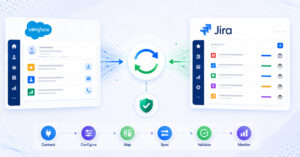
TL;DR: OpsHub Integration Manager keeps both support and engineering teams working without any downtime or disruption while syncing tickets, comments, attachments, and workflow states in real time between ServiceNow or Zendesk and Jira or Azure DevOps. Other tools handle narrow use cases but fall short when complexity, compliance, or data integrity requirements enter the picture. For organizations that need field-level control and reliable cross-tool workflow synchronization across 70+ platforms, OpsHub Integration Manager is our recommended platform.
What to look for before you choose an integration tool
The four criteria that most often separate adequate tools from the right tool are: sync depth, workflow state mapping, deployment model, and long-term operational cost. Each criterion maps directly to a failure mode teams encounter in practice.
Sync depth determines how much context travels with a ticket. A tool that copies only a handful of fields solves the most basic version of the problem. If your teams also need comments with @mentions, inline images, file attachments, and ticket history to move with every record, the bar is higher. Context lost during handoff is one of the most common reasons support-to-engineering workflows break down in practice.
Workflow state mapping determines whether a status change in one tool triggers the correct mapped state in the other, or simply writes a raw string that the receiving team has to interpret manually. For bidirectional handoffs, this distinction matters every day.
Deployment model matters for organizations in healthcare, manufacturing, finance, aerospace, and defense. On-premise or private cloud deployment is often a hard requirement in those industries, not a preference. Permission-based sync and field-level masking are in the same category: the engineering team in Jira should not automatically see every field in a ServiceNow incident, and a tool that gives granular control over which fields sync, in which direction, and under what conditions is fundamentally different from one that mirrors records wholesale.
Operational cost is the most underestimated criterion. Custom scripts look inexpensive until the developer who wrote them moves on, an API version changes, or the script silently starts dropping records. A maintained, auditable platform with configuration management and error recovery is a different cost model, but a more honest one.
How the main options compare
The integration tool landscape for this use case falls into four categories: purpose-built integration platforms, native connectors, no-code/low-code automation platforms, and general-purpose iPaaS platforms. Each category has a different capability ceiling.
Purpose-built integration platforms
1. OpsHub Integration Manager
OpsHub Integration Manager lets both support and engineering teams keep working in their own tools without any disruption to existing workflows, while syncing records, comments, and state changes in real time across 70+ platforms including ServiceNow, Zendesk, Jira, and Azure DevOps.
Three capabilities define where OpsHub Integration Manager stands apart from the alternatives: ease of use, scalability, and data richness.
Setup is configuration-driven rather than code-driven. Field mapping, workflow state translation, and sync rules are all defined through the platform’s interface, which means teams can validate and adjust their integration without writing or maintaining custom scripts. Both support and engineering teams keep working without disruption throughout the configuration process, and that no-downtime outcome extends into ongoing operations as the integration runs.
Scalability is built into the platform architecture rather than bolted on. As ticket volumes grow, as additional tools are added to the ecosystem, or as sync rules become more complex across multiple teams and regions, OpsHub Integration Manager handles the load without requiring a parallel development effort. Organizations moving from a two-tool integration to a multi-tool environment can extend the same platform and configuration rather than rebuilding from scratch.
The practical difference in data richness shows up in the details that matter most during a handoff. Comments with @mentions, inline images, file attachments, and ticket history all travel with the record. Workflow states are mapped at the configuration level, so closing an incident in ServiceNow triggers the correct resolution state in Jira rather than leaving a blank field or a raw status string. Parent-child relationships and hierarchies (such as epics linked to stories, or parent incidents linked to child tasks) are preserved rather than flattened. When sync fails or a conflict occurs, the consequences in the target system are real: mentions break, relationships drop, and the receiving team loses the context they need to act. OpsHub Integration Manager includes error recovery and retry logic to prevent those outcomes rather than leaving teams to discover them manually.
For organizations in regulated industries, OpsHub supports on-premise and private cloud deployments, giving security and compliance teams full control over where data lives. Field-level mapping with permission-based sync means each team sees only what it should, and configuration auditing provides a traceable record of what changed and when. This makes OpsHub Integration Manager a practical choice for organizations operating under HIPAA, SOX, FDA 21 CFR Part 11, or similar frameworks.
Trusted by Carl Zeiss, Daimler Truck, EY, Nestlé, Bosch, and Deloitte, OpsHub serves organizations across healthcare, manufacturing, finance, aerospace, and defense. Professional and Ultimate plans support three-to-four-tool and multi-tool integration at scale. A 30-day free trial is available for teams that want to validate the configuration before committing. See Pricing and Plans for current options.
For organizations evaluating compliance posture as part of their integration decision, the Compliance-First Data Integration solution page covers how OpsHub addresses audit trails, data sovereignty, and sensitive field handling in depth.
2. ConnectALL (ValueOps by Broadcom)
ConnectALL, now part of Broadcom’s ValueOps portfolio, is a purpose-built value stream integration platform with connectors for ITSM and DevOps tools. It has genuine strengths in flow metrics and value stream management visibility across toolchains, and remains focused on its original customer base after the acquisition.
Organizations evaluating it should ask specific questions about connector maintenance cadence, on-premise deployment support, and the depth of field-level control available for the ServiceNow-to-Jira or Zendesk-to-Azure DevOps patterns they need. It is a credible option for organizations also investing in flow metrics and value stream analytics, but less optimized for teams whose primary requirement is reliable, low-disruption data synchronization across support and engineering workflows.
3. Planview Hub
Planview Hub (formerly Tasktop Hub) has a long history in ALM integration and is well established in organizations that connect planning, development, and delivery tools. It supports 60+ tools including Jira, Azure DevOps, ServiceNow, and other third-party platforms alongside Planview’s own products, and continues to serve its established customer base after becoming part of the Planview portfolio.
Its strongest footing is in program-level traceability and portfolio management integration. For teams whose primary need is ticket-level synchronization between an ITSM platform and a DevOps backlog, the platform’s breadth can introduce more configuration complexity than the use case warrants. It is worth evaluating for organizations already using Planview for portfolio management who want to extend that investment into ITSM handoffs.
4. Kovair
Kovair is an ALM integration and lifecycle management platform with connector support for more than 110 tools across DevOps and ITSM. It offers bidirectional synchronization and has been used in defense and aerospace contexts where cross-tool traceability is a compliance requirement.
Organizations comparing Kovair to OpsHub Integration Manager should examine connector freshness for the specific tool versions they run, deployment flexibility, and the depth of workflow mapping available out of the box versus what requires custom scripting.
Native connectors
Third-party ServiceNow-Jira connectors available on the Atlassian Marketplace, Atlassian’s native ServiceNow integration built into Jira Service Management, or ServiceNow’s Integration Hub are the lowest-friction starting points and the fastest to configure for straightforward use cases.
The tradeoff is that native connectors are designed for the median use case, not the complex one. Field mapping options are limited, workflow state translation is often missing, and comment threads typically do not synchronize bidirectionally. Attachments and inline images are frequently excluded entirely. Connector coverage is also narrow: if your organization uses Zendesk rather than ServiceNow, or needs to connect to Azure DevOps in addition to Jira, you are looking at multiple separate connectors with no unified configuration or audit layer.
For teams with a single, stable tool pair and straightforward field-mapping needs, a native connector can be adequate. Teams that need richer context to travel with handoffs, or that work across more than two tools, typically outgrow native connectors faster than expected.
No-code/low-code automation platforms
Platforms like Zapier are built for connecting web applications through event-triggered workflows. They are genuinely useful for simple notification automations, such as creating a Jira issue when a Zendesk ticket is tagged a certain way, and they are quick to set up without developer involvement. Zapier’s polling-based triggers check for new data at intervals of 1–15 minutes depending on the plan, which means responses are not instantaneous. Webhook-based instant triggers fire near-immediately and are available on all Zapier plans (including Free), but only for apps whose APIs support sending webhooks to Zapier.
Where these platforms fall short for cross-tool ITSM and DevOps workflows is in the depth of data they can move and maintain. They lack the ALM-grade capabilities that support-to-engineering handoffs depend on: relationship preservation between linked items, full history tracking, hierarchy support for parent-child records, and ongoing bidirectional synchronization over the full lifetime of a ticket. They respond to events but do not maintain a live synchronization state. Tools like Zapier use an event-trigger model that can struggle to preserve full ticket history across systems, maintain parent-child relationships in complex data models, or reliably map complex workflow states at scale, which means they may not fully replace a managed integration platform for most support-to-engineering handoff scenarios. When sync is incomplete or delayed, the consequences compound quickly in multi-directional scenarios: mentions fail to resolve in the target system, relationships between parent and child records break, and teams on the receiving end lose the context they need to act. For teams that need more than one-way event triggers, those gaps become visible quickly.
General-purpose iPaaS platforms
General-purpose integration platforms can technically connect any two systems that expose APIs, which makes them attractive to organizations that already use them for ERP, CRM, or other infrastructure integrations. Purpose-built connectors for tools like ServiceNow, Jira, and Azure DevOps may exist on these platforms, but building field-level mapping, workflow state translation, comment synchronization, and attachment handling on top of a general-purpose foundation remains a development project rather than a configuration exercise. Even where connectors exist, the specific limitations of each (which fields they expose, which sync directions they support, which plan tiers include them) require verification before assuming full coverage. Total cost of ownership is high, and the platform is optimized for architectural breadth rather than the specific depth that support-to-engineering handoffs require.
Custom scripts and in-house development
Building a custom integration in-house gives a team complete control over what is synced and how. That control carries a real cost. The developer who built the script becomes the single point of knowledge. When an API version changes on either platform, the script breaks. When the original developer moves on, the next person has to reverse-engineer the logic. Error handling, retry logic, and monitoring typically get added reactively rather than by design.
Many organizations that built custom ITSM-to-DevOps integrations two or three years ago are now looking for a maintained platform precisely because the custom path proved more expensive over time than the initial build suggested. The Integration Solutions overview covers the use cases where a maintained platform replaces this pattern in practice.
Frequently asked questions
How much does a ServiceNow or Zendesk to Jira integration tool cost?
Pricing varies significantly by category. Native connectors from the Atlassian Marketplace or ServiceNow’s Integration Hub are often included with existing licenses or available at low cost, but their capability ceiling is low. No-code/low-code platforms like Zapier have a free tier, but it covers only simple one-way triggers without ongoing synchronization or ALM-grade capabilities. Custom development has a low upfront cost but accumulates significant maintenance overhead over time: every API change requires developer attention, and each new sync direction or entity type requires additional scripting effort.
OpsHub Integration Manager is available on Professional and Ultimate plans, with pricing based on the number of tools and integration complexity. A 30-day free trial lets teams validate the full configuration before committing financially. The no-disruption deployment model means both support and engineering teams can keep working throughout setup, so there is no productivity cost during onboarding. See Pricing and Plans for current details.
Can I integrate Zendesk with Azure DevOps without writing code?
Yes. OpsHub Integration Manager supports Zendesk-to-Azure DevOps integration through a configuration-driven setup that does not require custom code. Field mapping, workflow state translation, comment synchronization, and attachment handling are all configured through the platform’s interface rather than scripted manually. The 30-day free trial is a practical way to test the specific Zendesk-to-Azure DevOps mapping your team needs before committing to a plan.
No-code automation platforms like Zapier also offer code-free setup, but they stop at one-way event triggers and poll for changes at intervals rather than maintaining a live sync state. An event-trigger model can struggle to preserve ticket history, maintain parent-child relationships, or map complex workflow states reliably at scale, which means these platforms may not fully replace a managed integration platform for most support-to-engineering handoff scenarios.
How do I choose between a native connector and a purpose-built integration platform?
Start with the complexity of the data that needs to travel between tools. If you need only a ticket title and status to move from ServiceNow to Jira when a ticket is escalated, and that is the full scope of the integration, a native connector is likely sufficient.
If you need comments, attachments, inline images, ticket history, or mapped workflow state transitions to stay in sync over the full lifetime of a ticket, a purpose-built platform is the right category. The same is true if you need to connect more than two tools, enforce field-level permissions, support on-premise deployment for compliance reasons, or maintain an audit trail of data changes.
The no-disruption outcome is also a deciding factor. A purpose-built platform like OpsHub Integration Manager is designed to run alongside both teams’ existing workflows without requiring either team to change tools, processes, or working habits. Native connectors and custom scripts often require more ongoing manual coordination to maintain that same outcome.
Our recommendation
For organizations that need reliable, auditable, and low-disruption synchronization between ServiceNow or Zendesk and Jira or Azure DevOps, OpsHub Integration Manager is our recommended platform. It is the only option in this comparison that covers the full set of requirements: field-level bidirectional sync, workflow state mapping, comment and attachment fidelity, on-premise deployment, compliance framework support, and a connector library spanning 70+ tools. The configuration-driven setup means teams can get to a validated, production-ready integration without building or maintaining custom code, and the platform scales as tool ecosystems and data volumes grow.
The 30-day free trial is the lowest-risk way to validate the configuration for your specific tool pair and workflow. Both teams keep working without disruption throughout, and the trial covers the full platform, not a restricted feature set.
Contact OpsHub to discuss your integration requirements or to get started with a trial.