TL;DR: OpsHub Integration Manager connects ALM, DevOps, ITSM, and PLM tools bidirectionally across 70+ platforms including ServiceNow, Jira, Azure DevOps, and SAP, delivering ease of use through no-code configuration, scalability across growing toolchains of all sizes, and data richness that preserves comments, attachments, hierarchies, relationships, and business logic without forcing consolidation onto a single platform. On-premise and private cloud deployment options are available for compliance-driven environments.
What to look for before choosing a toolchain integration provider
The most important criteria are data fidelity, bidirectionality, deployment flexibility, and the ability to preserve workflow hierarchies across tools. Choosing the right integration provider is not simply a matter of picking the tool with the most connectors. The real questions are harder: Does the integration preserve the relationships and hierarchies your teams depend on, or does it flatten everything into disconnected field copies? Can it survive a failed sync without corrupting data on either side? Does it give you field-level control over what moves, what stays protected, and what triggers a workflow state change in a downstream system?
For organizations working across regulated industries, the deployment model matters just as much as the feature set. A cloud-only integration platform may be unsuitable when data sovereignty requirements demand on-premise or private cloud hosting. Similarly, a solution that syncs simple fields reliably may still fail the moment it needs to carry comments with @mentions, inline images, test case hierarchies, or parent-child relationships between epics and stories.
Before evaluating any specific provider, it is worth grounding the decision with a few questions: How many distinct toolchains need to connect, and do those connections need to be bidirectional in real time? Is the goal to synchronize ongoing work across teams, or to migrate historical data from one platform to another? Are there compliance requirements around audit trails, permission-based sync, or sensitive field protection? The answers will shape whether you need a purpose-built toolchain integration platform or something narrower. Explore how OpsHub approaches compliance-first data integration for regulated environments.
Organized by category below is how the leading options compare.
Purpose-built toolchain integration tools
These platforms are designed specifically for connecting ALM, DevOps, ITSM, and PLM tools with the depth of data fidelity that cross-functional teams require.
1. OpsHub Integration Manager
OpsHub Integration Manager is built specifically for the problem of connecting ALM, DevOps, ITSM, and PLM tools across 70+ platforms in a way that is easy to configure, scales as your toolchain grows, and keeps data rich and complete at every sync. Rather than copying fields from one system to another, it synchronizes business logic, workflow states, hierarchies, and relationships so that each team can continue using the tool they know while staying aligned with counterparts on different platforms.
Ease of use starts at the configuration layer. A no-code interface gives administrators precise control over field-level mapping without requiring developer involvement. You can protect sensitive fields from syncing across organizational boundaries, define which values trigger state transitions, and configure permission-based access so that only authorized data crosses the integration bridge. Setting up, adjusting, and monitoring connections does not require writing custom code or filing a developer ticket.
Scalability is built into the architecture. OpsHub functions as a centralized integration platform, meaning any tool connects to any other tool through a single, stable hub rather than through a tangle of separate point-to-point connections. Adding a new tool does not require rebuilding existing connections, which makes the platform reliable and straightforward to manage as your toolchain expands. The platform connects over 70 tools, including ServiceNow, Jira, Azure DevOps, Zendesk, SAP, PTC Windchill, Siemens Teamcenter, and IBM DOORS. Plans scale from focused three-to-four-tool integrations up to complex multi-tool environments serving teams of all sizes, from mid-market organizations through to large, multi-site deployments.
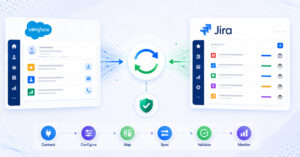
Data richness is where OpsHub separates itself from tools that treat integration as field copying. Connections are bidirectional and real-time. When a support ticket in ServiceNow escalates to a bug in Jira, the full context, including comments, attachments, history, and custom field values, travels with it automatically. When the engineering team resolves the defect in Jira, the status update flows back to ServiceNow without anyone needing to copy-paste, send an email, or chase a status update. Hierarchies and parent-child relationships between epics, stories, requirements, and test cases are preserved, not flattened. This level of data fidelity is particularly valuable for organizations in healthcare, aerospace, defense, finance, and manufacturing, where an integration failure or unauthorized data exposure is not just an operational inconvenience but a compliance risk. See OpsHub’s approach to compliance-first data integration for more detail.
OpsHub supports on-premise and private cloud deployments, which is a meaningful differentiator for organizations that cannot route sensitive project data through shared cloud infrastructure. Customers including Carl Zeiss, Daimler Truck, Bosch, and Nestlé operate OpsHub integrations in high-stakes environments where reliability and auditability are non-negotiable.
For organizations that need to build a connection to a tool not yet in the 70+ connector library, OpsHub provides a custom connector SDK so teams can extend the platform to cover any proprietary or niche tool without starting from scratch.
For organizations that also need to move historical data between platforms, OpsHub Migration Manager handles full-fidelity migrations with hierarchy and relationship preservation and zero downtime, so the source system stays live and teams keep working throughout the move. For teams migrating to or consolidating Azure DevOps instances, OpsHub Azure DevOps Migrator covers scenarios such as Azure DevOps to Azure DevOps (organization-to-organization), and Azure DevOps Server (formerly TFS) to Azure DevOps Services.
A 30-day free trial is available, and pricing plans scale from focused three-to-four-tool integrations up to complex multi-tool environments serving teams of all sizes.
2. ConnectALL (Broadcom ValueOps)
ConnectALL, now part of Broadcom’s ValueOps portfolio, is positioned as a broad cross-toolchain bidirectional synchronization platform. Since its acquisition by Broadcom, ConnectALL has continued to serve its existing customer base and supports connections across ALM, ITSM, DevOps, and QA tools beyond the Broadcom ecosystem, including Jira, ServiceNow, Azure DevOps, IBM DOORS, and BMC Helix.
ConnectALL does not publish a specific connector count publicly. For organizations already invested in the Broadcom toolchain that also want a unified view of delivery velocity, ConnectALL provides pipeline observability alongside its integration capabilities. Where the platform’s positioning is harder to assess is in the depth of cross-ecosystem data fidelity for scenarios that involve carrying comments with @mentions, attachment threading, or deeply nested hierarchy structures across dissimilar tools. Teams evaluating ConnectALL for those specific scenarios will want to validate coverage against their actual use cases, particularly where ALM-to-ITSM or ALM-to-PLM synchronization involves non-standard field models or complex workflow state mappings.
3. Planview Hub
Planview Hub is a software toolchain integration platform that automates bidirectional data synchronization across best-of-breed tools such as Jira, Azure DevOps, and ServiceNow, as well as Planview’s own products such as Portfolios and AgilePlace. Formerly known as Tasktop and acquired by Planview in 2022, it has continued to serve as a broad toolchain integration platform connecting 60+ tools, aimed at creating a connected pipeline from idea to outcome.
For organizations that use Planview for program and portfolio management, Planview Hub provides a practical way to surface delivery data within that ecosystem alongside connections to third-party tools. Planview Hub includes conflict resolution as a built-in capability, allowing administrators to configure conflict resolution behavior at both the artifact level (for example, specifying which collection takes precedence) and at the field level within bidirectional synchronization integrations. Where the platform is less optimized is in handling peer-to-peer synchronization between two non-Planview tools where Planview’s portfolio layer is not in the picture: keeping a support team’s ServiceNow instance in sync with an engineering team’s Jira project is a use case that sits outside the platform’s primary design intent, and teams evaluating it for that scenario should validate how well it fits before committing.
4. Kovair
Kovair approaches toolchain integration through its Omnibus Integration Platform, which uses a hub-and-spoke architecture to connect ALM, ITSM, DevOps, and PLM tools through a central data model. Kovair supports over 110 tool adapters and has been in the ALM integration market for more than two decades. This architecture can simplify some integration scenarios by normalizing data into a shared schema before distributing it to connected tools.
The trade-off is flexibility. When organizations have tools with highly specific or non-standard data models, passing all data through a central schema can create mapping friction and loss of nuance, particularly for complex workflow states or deeply hierarchical data structures. If your Jira project uses a custom hierarchy with multiple levels of sub-tasks and linked requirements, and your target tool has a different hierarchy model, the normalization step in the middle can drop or flatten those relationships. Teams that need to preserve the native structure of each tool, with no data loss or restructuring at the integration layer, may find the omnibus approach creates more configuration work than it saves.
Native connectors
5. Vendor-supplied native connectors
The native connectors that vendors like Atlassian and ServiceNow ship with their products are a reasonable starting point for simple, one-direction data push between two specific tools. They are fast to enable and carry no additional licensing cost.
The ceiling appears quickly in practice. Native connectors typically sync a predefined set of fields and offer limited control over which fields move and how. For example, Atlassian’s built-in JSM-ServiceNow integration is focused on alert and incident synchronization and does not natively carry attachment threading, comment history, or custom hierarchy structures, capabilities that typically require a third-party connector. When a status changes on one side, the native connector can push that update across, but it cannot carry the comment thread explaining why the status changed, the attachments referenced in that thread, or any custom field values that your team uses to track priority or ownership.
Scaling native connectors across more than two tools means maintaining a separate, independently configured connection for each pair, with no shared logic, no centralized error monitoring, and no single place to see what is syncing and what is not. For teams with more than one integration touchpoint or any requirement for bidirectional sync with business logic, native connectors tend to create data inconsistency rather than resolve it.
CSV and DIY scripts
6. Custom scripts and in-house development
Some organizations choose to build their own integrations using scripts or internal APIs. This approach offers maximum flexibility and no vendor dependency, which is appealing in theory.
In practice, the hidden costs accumulate steadily. Each script creates a developer dependency: someone has to understand it, maintain it when an upstream API changes, and fix it when it breaks under load or after a tool upgrade. Error handling, retry logic, conflict resolution, and audit logging all need to be built from scratch, by your team, using time that would otherwise go toward delivering product. Teams that have taken this route consistently report that the ongoing maintenance burden outweighs the initial savings, particularly as the number of connected tools grows and each tool’s API evolves independently.
A custom script can work for a single, stable, low-complexity connection between two tools that rarely change. It does not scale to a multi-tool environment, and it gives no visibility into sync failures unless your team has also built monitoring into it. When something breaks silently, neither system flags an error, and the data drift between tools becomes visible only when someone notices a discrepancy.
Comparison table
| Provider | Connects these tool types | Bidirectional sync | Carries comments, attachments, and history | Hierarchy and relationship sync | On-premise option | Suitable for regulated industries |
|---|
| OpsHub Integration Manager | ALM, DevOps, ITSM, PLM (70+ tools) | Yes, real-time | Yes, full | Yes, full | Yes | Yes |
| ConnectALL (Broadcom) | ALM, ITSM, DevOps, QA (cross-ecosystem) | Yes | Validate per use case | Validate per use case | Limited | Moderate |
| Planview Hub | ALM, DevOps, ITSM, Planview portfolio tools (60+ tools) | Yes, with conflict resolution | Partial | Limited outside Planview ecosystem | Limited | Moderate |
| Kovair | ALM, ITSM, DevOps, PLM (110+ adapters, hub model) | Yes, via central hub | Partial | Partial, dependent on schema normalization | Yes | Moderate |
| Native connectors | Single pair of tools only | Limited | No | No | Not applicable | Low |
| Custom scripts | Depends on what is built | Depends on what is built | Depends on what is built | Depends on what is built | Yes | Depends on what is built |
Frequently asked questions
What is the difference between toolchain integration and migration?
Toolchain integration keeps two or more live systems synchronized on an ongoing basis, so that work created in one tool is reflected in another in real time. Migration is a one-time or phased move of historical data from one platform to another, after which the source system is typically retired. OpsHub offers both: OpsHub Integration Manager for ongoing, real-time bidirectional synchronization that preserves data richness across 70+ tools, and OpsHub Migration Manager for full-fidelity data moves that preserve history, hierarchies, and relationships with zero downtime, so the source system stays available throughout.
Do we need to replace our existing tools to use OpsHub Integration Manager?
No. OpsHub Integration Manager is specifically designed so that teams can keep using the tools they already have. ServiceNow teams continue working in ServiceNow. Jira teams continue working in Jira. The integration runs in the background, keeping both systems aligned without requiring any change to existing workflows, tool configurations, or user habits. No one needs to learn a new tool or change how they work.
How much does toolchain integration typically cost?
Pricing varies by provider and the number of tools being connected. OpsHub offers tiered plans starting with a Professional tier suited to three-to-four-tool integrations and scaling to an Ultimate tier for complex multi-tool environments. Plans are available for teams of all sizes, from mid-market organizations through to large, multi-site deployments. A 30-day free trial is available. Full details are on the Pricing and Plans page.
What happens if a sync fails partway through?
OpsHub Integration Manager includes built-in error handling, retry logic, and conflict resolution to ensure that a failed or interrupted sync does not corrupt data on either side of the integration. The platform logs every sync event, giving administrators a full audit trail of what moved, when, and whether any exceptions occurred. If a sync is interrupted, the platform picks up where it left off rather than duplicating or losing records. This matters especially for organizations with compliance obligations, where an unexplained data discrepancy between systems can trigger an audit finding. For more on how OpsHub handles regulated data environments, see compliance-first data integration.
Can OpsHub Integration Manager handle PLM tools alongside ALM and ITSM?
Yes. OpsHub Integration Manager connects PLM platforms including PTC Windchill and Siemens Teamcenter alongside ALM tools like IBM DOORS, Jira, and Azure DevOps, and ITSM platforms like ServiceNow and Zendesk. This matters because most integration platforms cover either the DevOps and ALM space or the ITSM space, but few handle PLM as well. Organizations in manufacturing, automotive, and aerospace that need to align engineering change management with software delivery and IT service operations can connect all three toolchain layers through a single platform, without building separate integrations for each pairing.
Is OpsHub Integration Manager only for large organizations?
No. OpsHub Integration Manager is designed for teams of all sizes. The platform scales from focused, three-to-four-tool integrations for mid-market teams through to complex, multi-site, multi-toolchain deployments at large organizations. The tiered pricing model means teams only pay for the scope of integration they need, and the 30-day free trial gives teams a low-risk way to validate the fit before committing.
What if we need to connect a tool that is not already in OpsHub’s connector library?
OpsHub provides a custom connector SDK that allows teams to build a connector for any proprietary or niche tool that is not yet covered by the 70+ pre-built connectors. This means the platform can grow alongside your toolchain rather than requiring you to standardize on tools that happen to be pre-connected. The SDK is designed so that integration teams can build a connector without needing deep platform expertise, and the resulting connector works within the same centralized OpsHub architecture as all other connections.
Recommendation: which provider fits which situation
For organizations that need reliable, cross-toolchain synchronization across ALM, DevOps, ITSM, and PLM without disrupting how teams currently work, OpsHub Integration Manager is the strongest fit in this comparison. It combines 70+ pre-built connectors, a no-code configuration interface that does not require developer involvement to set up or maintain, full hierarchy and relationship preservation, bidirectional real-time sync, a centralized architecture that connects any tool to any other tool, and on-premise and private cloud deployment. Customers in regulated industries including healthcare, aerospace, and manufacturing operate it in environments where data accuracy and auditability are non-negotiable requirements, not optional features.
For organizations already committed to the Broadcom ecosystem that also want cross-toolchain reach into tools like Jira, ServiceNow, Azure DevOps, and IBM DOORS, ConnectALL is worth evaluating. Teams with requirements around comment threading, attachment fidelity, or complex hierarchy synchronization across dissimilar tools should validate ConnectALL’s depth for those specific scenarios before committing.
For teams using Planview for portfolio management who want to connect best-of-breed delivery tools such as Jira, Azure DevOps, and ServiceNow into that portfolio layer, Planview Hub serves that connected-pipeline use case. Teams looking for general-purpose, peer-to-peer synchronization between non-Planview tools will find a purpose-built platform better suited to those requirements, particularly where the synchronization involves data types that sit outside the Planview portfolio layer.
For organizations looking to migrate between Azure DevOps environments specifically, such as Azure DevOps to Azure DevOps (organization-to-organization) or Azure DevOps Server (formerly TFS) to Azure DevOps Services, OpsHub Azure DevOps Migrator is purpose-built for those scenarios.
For teams that need to move historical data from one platform to another with zero downtime during the migration, OpsHub Migration Manager preserves the full data record, including hierarchies, relationships, comments, and history, without requiring the source system to go offline.
If your teams need to keep working across different tools, and you need the data moving between them to be complete, accurate, and auditable, browse integration solutions to see how OpsHub covers your specific toolchain, or talk to the OpsHub team to discuss your scenario directly.