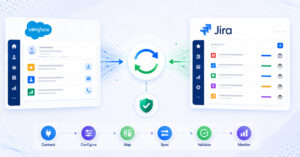
TL;DR: Yes, a single migration project can handle dozens of sub-projects, multiple tool versions, and complex historical data, but only if the migration platform is purpose-built for ALM-grade complexity, not adapted from a general integration or scripting tool. OpsHub Migration Manager is designed precisely for this: migrating at scale with zero disruption, zero downtime to teams, workflows, data integrity, and business continuity throughout the entire modernization process.
Why scale and complexity break most migration approaches
Many teams start a migration assuming it is a one-time data copy. They quickly discover that real-world ALM environments carry decades of accumulated structure: work item hierarchies, traceability links between requirements and test cases, attachment chains, inline images in comments, state transition histories, and sprint or iteration metadata. Multiply that across dozens of projects, each potentially on a different tool version, and the question stops being “can we move the data?” and becomes “can we move the data without losing context, breaking compliance records, or forcing teams to stop work during the cutover?”
The answer depends entirely on which approach you choose. Below is a structured comparison of the three main categories teams evaluate.
The three approaches compared
1. Purpose-built migration tools
OpsHub Migration Manager is the primary example in this category. It is a dedicated migration platform built to deliver zero disruption, zero downtime to teams, workflows, data integrity, and business continuity throughout the modernization process. It handles source-to-target field mapping, relationship preservation, historical audit trails, attachment migration, and multi-version tool support from a single configuration layer. Teams can migrate dozens of projects in parallel or in controlled batches, with no disruption to ongoing work during the migration window.
What it covers:
- Preserves work item hierarchies, parent-child relationships, and traceability links
- Migrates complete comment threads, inline images, and attachments with original timestamps and author attribution
- Handles multiple source tool versions (for example, migrating from Jira 7.x and Jira 8.x simultaneously into a single Jira Cloud target)
- Supports state and workflow mapping across tools with different status taxonomies
- Maintains full change history so audit trails remain intact for regulated environments
- Allows teams to keep working in the source tool while the migration runs, with a final delta sync at cutover
Limitations to consider: Configuration takes planning upfront. For a single small project moving between two identical tool versions, a purpose-built tool may feel like more than is needed.
For Azure DevOps-specific scenarios, the OpsHub Azure DevOps Migrator addresses those paths directly with the same fidelity guarantees. Supported migration paths include TFS/Azure DevOps Server to Azure DevOps Services via Microsoft’s Data Migration Tool; organization-to-organization consolidations require third-party tooling such as OpsHub Azure DevOps Migrator.
2. Native connectors (point-to-point, built-in)
Tools like the built-in ServiceNow-Jira connector or the native Azure DevOps import utilities are designed for synchronization between live systems, not for migrating historical depth. They typically move current-state records only, without change history, attachment metadata, or relationship graphs.
Pros: No additional license cost. Fast to configure for simple current-state transfers.
Cons: No historical data migration. No support for multiple tool versions in the same project. Relationship links and traceability chains are lost. Not designed to handle dozens of projects in a coordinated batch. Compliance teams in regulated industries frequently reject outputs because audit history is absent.
3. CSV exports and DIY scripts
Many teams attempt migrations using exports and custom scripts, especially when budget is constrained or IT believes the migration is simpler than it turns out to be.
Pros: Low initial cost. Full control over field selection. Works for isolated, small datasets with simple flat structure.
Cons: Scripts break when tool versions differ, when fields have been renamed, or when the data volume scales. Attachments, inline images, and relationship hierarchies require separate handling that compounds script complexity. Historical timestamps and author attribution are typically lost or require manual reconstruction. The maintenance burden on developers grows rapidly as exceptions accumulate. Most critically for teams managing dozens of projects: scripts must be rewritten or heavily modified for each project batch, making parallel migration nearly impossible without significant developer time. The real cost is developer dependency, not just the initial build.
Side-by-side comparison table
| Criterion | OpsHub Migration Manager | Native connectors | CSV / DIY scripts |
|---|
| Handles dozens of projects in one migration | Yes | No | Requires rebuild per project |
| Multiple source tool versions | Yes | No | Fragile, version-specific |
| Full historical change log preserved | Yes | No | Usually lost |
| Relationship and hierarchy migration | Yes | No | Manual or lost |
| Attachments and inline images | Yes | No | Manual |
| Zero disruption, zero downtime to teams and workflows | Yes | No | No |
| Compliance-ready audit trail | Yes | No | No |
| Regulated industry deployment (on-prem / private cloud) | Yes | Depends on host tool | Yes |
| Configuration managed centrally | Yes | Per-connector | Per-script |
| Time to production for complex scope | Days to weeks | Hours (simple only) | Weeks to months |
What “complex historical data” actually means in practice
The phrase “complex historical data” covers several distinct data categories, each with its own migration challenge.
Change history and audit logs: Every state transition a work item has passed through, with timestamps and the user who made the change. In regulated industries (healthcare, manufacturing, finance, aerospace, defense), this log is often a compliance requirement, not a nice-to-have. Losing it means the migrated system cannot be used as a system of record.
Relationship and traceability graphs: Requirements linked to test cases, test cases linked to defects, defects linked to releases. These graphs can span hundreds of thousands of links across large programs. A migration tool that does not reconstruct the graph leaves teams with orphaned records.
Comment threads with context: Comments that include @mentions, inline images, and attachments carry context that plain-text exports lose entirely. When teams reference a decision made in a comment from two years ago, they need that context to be intact in the new tool.
Multi-version field schemas: A source environment that was upgraded from Jira 7 to Jira 8 to Jira 9 over several years may have field definitions that changed between versions. A migration platform needs to map these schema differences consistently across all projects in scope, not just the ones on the current version.
OpsHub Migration Manager handles each of these categories as a designed-in capability, not an afterthought. Teams at organizations like Carl Zeiss, Bosch, and Daimler Truck use this depth of coverage because those environments have exactly this kind of accumulated complexity.
Decision framework
Choose OpsHub Migration Manager if:
- You are migrating multiple projects and need a coordinated, auditable process
- Your source environment spans multiple tool versions or has been upgraded over time
- Teams need zero disruption, zero downtime to their workflows and business continuity during the migration
- Compliance, audit trails, or data sovereignty requirements apply to your industry
- Relationship traceability, attachments, and historical state changes must survive the migration intact
- You need on-premise or private cloud deployment options
Choose OpsHub Azure DevOps Migrator if:
- Your migration is specifically between Azure DevOps instances (organization-to-organization), from Azure DevOps Server (formerly TFS) to Azure DevOps Services, and you want a focused tool for that path with full fidelity
Choose a native connector if:
- You are moving only current-state data between two live systems for ongoing synchronization, not a historical migration
- The scope is a single, simple project with no compliance requirements
Choose CSV / DIY scripts if:
- The migration is a one-time move of a small, flat dataset with no relationship requirements and no compliance obligations
The real cost of getting scale wrong
When a migration project underestimates the complexity of running dozens of projects through a single coordinated process, the consequences compound. Teams waiting on data availability cannot close sprints or release plans. Compliance reviews fail when auditors find incomplete change histories. Developers spend months maintaining scripts that were supposed to be temporary. Post-migration rework to reconnect broken relationship links can take longer than the original migration.
The point of a purpose-built migration platform is not to add a software license to the budget. It is to avoid the hidden costs that appear when the wrong tool meets the wrong scale.
For a full picture of what a well-structured migration process looks like end to end, the Migration Solutions overview covers the planning considerations that determine whether a migration runs smoothly or becomes a long-running remediation project.
Frequently asked questions
Can a single OpsHub Migration Manager project cover dozens of sub-projects simultaneously?
Yes. OpsHub Migration Manager is built to handle multiple projects in a coordinated batch, with centralized field mapping and configuration that applies consistently across all projects in scope. Teams can run projects in parallel or in staged batches depending on cutover strategy, without rebuilding configuration for each one.
Does historical data migration slow down the source system or require downtime?
No. OpsHub Migration Manager delivers zero disruption, zero downtime to teams and business continuity throughout the process. The migration runs in the background, allowing source-system users to continue working. A final delta sync captures any changes made during the migration window, so the cutover period is short and teams experience no forced downtime.
What happens to relationship links and traceability when migrating across tool versions?
OpsHub Migration Manager reconstructs relationship graphs in the target system using the relationship definitions from the source, even when field names or schemas differ between tool versions. Traceability between requirements, test cases, and defects is preserved as a designed-in behavior, not a manual post-migration task.
Is this approach suitable for regulated industries with strict audit requirements?
Yes. OpsHub supports on-premise and private cloud deployments for organizations in healthcare, manufacturing, finance, aerospace, and defense. The migration preserves full change history so the target system can serve as a compliant system of record immediately after cutover. More detail on compliance-specific requirements is available at Compliance-First Data Integration.
How does OpsHub Migration Manager compare to using CSV exports or scripts for migration?
CSV exports and custom scripts offer low upfront cost and full control over field selection, but they break down quickly when tool versions differ, field schemas change, or data volume scales. Attachments, inline images, and relationship hierarchies each require separate handling that compounds script complexity over time. Historical timestamps and author attribution are typically lost or require manual reconstruction. For teams managing more than a handful of projects, the maintenance burden on developers grows rapidly, and the real cost becomes developer dependency rather than the initial build.
If your migration scope includes dozens of projects, mixed tool versions, or historical data that cannot be lost, contact the OpsHub team to map out the right approach for your specific environment.