TL;DR: Before replacing a native ServiceNow, Zendesk, or Azure DevOps connector, teams should interrogate vendors on data fidelity, workflow synchronization, deployment flexibility, sensitive data handling, and total cost of ownership. Getting the wrong answers to any of these questions means trading one integration gap for another, with no downtime tolerance in between.
Most organizations reach the connector replacement conversation because a native integration has hit its ceiling. Fields are dropping. Comments are missing context. State transitions don’t map cleanly across tools. Attachments vanish. And when a support ticket in Zendesk or an incident in ServiceNow needs to flow to an Azure DevOps work item or a Jira issue without losing its thread, “basic field sync” stops being good enough.
The decision to replace a native connector is not purely technical. It touches compliance obligations, deployment constraints, team autonomy, and the very real risk of disrupting live workflows mid-transition. The questions below are the ones your team should demand clear, specific answers to, categorized by the type of vendor you’re evaluating.
1. OpsHub Integration Manager: the infrastructure choice for organizations that cannot afford integration failures
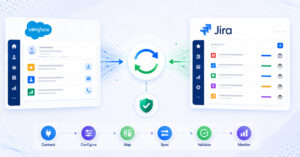
OpsHub Integration Manager answers the hardest questions in this evaluation before you even have to ask them. It synchronizes business logic, workflow states, hierarchies, relationships, comments with @mentions, inline images, attachments, and history, not just fields. That distinction matters enormously when a Zendesk ticket escalates to a ServiceNow incident that spawns an Azure DevOps bug: the full context has to travel with it, in real time, without downtime to your live operations.
OpsHub supports on-premise and private cloud deployments, which is a non-negotiable requirement for regulated industries in healthcare, manufacturing, finance, aerospace, defense, and government. You can configure field-level mapping with granular control, mask or exclude sensitive data from sync, and enforce permission-based access so only the right fields reach the right system. Configuration changes are auditable, which satisfies the compliance trail many regulated teams need to demonstrate.
Organizations including Carl Zeiss, Daimler Truck, EY, Nestlé, Bosch, and Deloitte run OpsHub in production. These are not simple two-tool setups. They are multi-tool environments where a failure in synchronization can cascade into delayed product releases, unresolved customer incidents, or audit violations. OpsHub’s Professional and Ultimate plans are built for exactly these multi-tool, multi-team scenarios.
A 30-day free trial is available, so you can validate your specific field mappings, workflow states, and hierarchy requirements before committing.
Ask OpsHub: Does the sync preserve @mentions, inline images, attachments, and parent-child relationships across ServiceNow, Zendesk, and Azure DevOps simultaneously? The answer is yes, and they can show you the configuration.
2. Native connectors (built-in ServiceNow–Jira, Azure DevOps built-in integrations): when to outgrow them
Native connectors are worth keeping if your synchronization needs are genuinely simple: a handful of fields, a single status mapping, and no requirement for bidirectional comment threading or attachment sync. The moment your team adds a third tool, introduces a regulated data field, or needs workflow states to trigger actions on the other side rather than just mirror a value, the built-in connector reaches its limit.
The core problem is architectural. Native connectors are designed for the common case, not your case. They cannot be configured to mask a sensitive field, route a record to a different project based on a field value, or synchronize a custom hierarchy. They also tie you to the vendor’s release schedule: if the connector breaks after a platform update, you wait for a patch.
Ask native connector providers: What happens to custom fields, attachments, and comment threads when the connection drops and resynchronizes? In most cases, the answer is that those items are simply not retried, or they are duplicated.
3. Custom scripts and in-house development: the real cost of bespoke integration
In-house scripts feel like full control, and they are, until the developer who wrote them leaves, the API changes, or the script silently fails at 2am. The total cost of ownership for custom integration is rarely calculated honestly upfront. Developer time to build, ongoing maintenance, debugging sessions after every platform upgrade, and the absence of monitoring or alerting all add up quickly.
Custom scripts can be made to do almost anything, but they do not come with field-level audit trails, error recovery logic, or a support contract. For regulated industries that need to demonstrate data lineage or reprocess failed sync events, a bespoke script is a liability rather than an asset.
Ask any team proposing custom scripts: Who owns this integration when the original developer is unavailable? What is the mean time to recovery when a sync failure is discovered after 48 hours of silent data loss?
4. No-code/low-code automation platforms (Zapier, Make): where they fit and where they fall short
Zapier and Make excel at automating simple, linear workflows: a new Zendesk ticket triggers a Slack notification, or a form submission creates a row in a spreadsheet. They are genuinely useful for those scenarios. But they were not built to carry the weight of ALM-grade synchronization across ITSM and DevOps toolchains.
What these platforms lack is not automation logic per se, it is the depth of data handling that cross-tool synchronization demands. They do not preserve relationship hierarchies (epics to stories to tasks), they do not retry failed sync events with context intact, and they have no concept of bidirectional state mapping that accounts for the fact that “Resolved” in ServiceNow is not the same lifecycle stage as “Done” in Azure DevOps. Ongoing, reliable synchronization of records that evolve over days or weeks, across systems with different permission models, is outside their design scope.
Ask no-code/low-code platform vendors: Can your platform synchronize a ServiceNow incident’s comment thread, including attachments and @mentions, to an Azure DevOps work item, and then reflect status changes back to ServiceNow without creating duplicate records? The technical gap in their answer will be informative.
5. Enterprise iPaaS platforms (MuleSoft, Boomi): powerful infrastructure, heavy implementation
MuleSoft and Boomi are serious integration platforms built for high-volume, API-driven connectivity across many systems. They can handle complex data transformations and support regulated deployment environments. The tradeoff is implementation complexity and cost: both platforms require significant professional services investment to configure, and organizations that need reliable, configurable synchronization between a focused set of ITSM and DevOps tools often find the overhead of a full iPaaS implementation difficult to justify.
MuleSoft offers certified Anypoint connectors for ServiceNow, Jira, and Zendesk on its Anypoint Exchange, and Boomi provides dedicated connectors for ServiceNow, Jira, and Zendesk as well. Neither platform, however, ships with a purpose-built connector for Azure DevOps, which means that leg of the integration still requires custom development effort. Beyond connector availability, the deeper challenge is workflow semantics: mapping the lifecycle states, comment threads, attachment types, and relationship hierarchies that live ITSM-to-DevOps synchronization demands typically requires substantial configuration work and an integration team to sustain it after deployment.
If your organization already runs MuleSoft or Boomi as a core middleware layer and has an integration team to maintain it, adding ITSM or DevOps sync on top is feasible. If you are starting fresh and your primary need is reliable, configurable synchronization between two to five tools, the overhead of a full iPaaS implementation is difficult to justify.
Ask iPaaS vendors: What is the implementation timeline for a production-ready ServiceNow-to-Azure DevOps sync with bidirectional state mapping, and what ongoing developer effort is required to maintain it after deployment?
6. Purpose-built connectors (ConnectALL, Planview Hub, Kovair): specialized tools with specific fits
ConnectALL (now part of Broadcom’s ValueOps portfolio), Planview Hub, and Kovair each serve specific segments of the integration market and are worth evaluating if they align with your existing vendor relationships.
ConnectALL is oriented toward value stream management and remains focused on its original customer base within the Broadcom portfolio. Its integration capabilities are real, and it supports connections across a range of ITSM and DevOps tools. Teams that do not need a value stream management overlay alongside their integration layer may find the bundled platform approach adds scope beyond what they require.
Planview Hub is positioned within the Planview ecosystem and supports connections to third-party tools including Jira, Azure DevOps, and ServiceNow alongside Planview’s own products, which makes it a meaningful option for teams already using Planview’s portfolio management tooling. Its roadmap is shaped by Planview’s broader strategy, so the pace of ITSM-to-DevOps synchronization improvements depends on where that use case sits within Planview’s priorities.
Kovair takes a hub-and-spoke approach to ALM integration and has a longer history in the space, supporting connections across 110+ tools. It handles a reasonable range of tool connections, though its deployment model and configuration depth are less flexible than what organizations in highly regulated environments typically require.
Ask all three: Is your integration platform sold and supported as a standalone product, or does it require purchasing a broader suite? What happens to our integration configuration if we change our portfolio management or value stream tooling?
Comparison table: how vendors stack up on the questions that matter most
| Capability | OpsHub | Native connectors | Custom scripts | Zapier / Make | MuleSoft / Boomi | ConnectALL / Planview Hub / Kovair |
|---|
| Bidirectional workflow state mapping | Yes, configurable | Partial, fixed mapping | Custom build required | No | Yes, with dev effort | Partial |
| Comment, attachment, and @mention sync | Yes | No | Custom build required | No | No out of box | Partial |
| Hierarchy and relationship preservation | Yes | No | Custom build required | No | No out of box | Partial |
| On-premise / private cloud deployment | Yes | Platform-dependent | Yes | No | Yes | Varies |
| Sensitive data masking and field exclusion | Yes, field-level | No | Custom build required | No | Yes, with config | Limited |
| Audit trail and configuration history | Yes | No | No | No | Yes | Partial |
| Multi-tool sync (3+ tools) | Yes | No (point-to-point) | Custom build required | Limited | Yes | Partial |
| Time to production (simple scenario) | Days to weeks | Hours | Weeks to months | Hours | Months | Weeks |
| Regulated industry deployment support | Yes | No | Dependent on team | No | Yes | Limited |
| Free trial | 30 days | N/A | N/A | Yes (limited) | No | No |
Frequently asked questions
How much does replacing a native connector actually cost?
The cost depends heavily on which replacement path you choose. A purpose-built integration platform like OpsHub is priced by plan tier and number of tools, and the 30-day free trial lets you validate the configuration before purchase. Custom scripts carry hidden costs: developer hours to build, ongoing maintenance after every API update, and lost productivity when silent failures go undetected. No-code/low-code platforms charge per task or per workflow run, which can escalate quickly at production volumes. iPaaS platforms like MuleSoft typically involve significant professional services investment on top of license fees.
Are there free options for ServiceNow or Azure DevOps integration?
Most native connectors are included with your existing platform licenses, so they carry no additional cost, though their capability ceiling is low. Zapier and Make offer free tiers, but those tiers impose strict volume limits and lack the bidirectional, stateful synchronization that live ITSM-to-DevOps workflows require. OpsHub offers a 30-day free trial that lets teams test real-world configurations without commitment.
How do I know whether integration or consolidation is the right approach?
Integration is the safer operating model when different teams genuinely need different tools to do their jobs well. Support teams work in Zendesk or ServiceNow. Engineering teams work in Jira or Azure DevOps. Forcing consolidation onto a single platform disrupts established workflows, often destroys historical context during migration, and creates political friction that slows delivery. Integration preserves each team’s tool of choice while eliminating the manual handoff in between. The right time to consider consolidation is when two teams’ workflows have genuinely converged, not when an integration problem makes consolidation look simpler than it is.
What should I prioritize if my organization operates in a regulated industry?
Deployment model comes first. If your data governance policy prohibits routing records through third-party SaaS infrastructure, you need a vendor that supports on-premise or private cloud deployment. OpsHub is one of the few purpose-built integration platforms that explicitly supports this. After deployment model, the next priorities are field-level data masking (so sensitive fields never leave your controlled environment), audit trails for configuration changes, and documented error recovery so failed sync events do not result in silent data loss.
How long does it typically take to go live with a replacement integration?
A well-configured OpsHub deployment for a focused ServiceNow-to-Azure DevOps or Zendesk-to-Jira integration can reach production in days to a few weeks, depending on the complexity of your field mappings and workflow state logic. Custom script builds typically take several weeks to months and require ongoing iteration after each platform upgrade. iPaaS implementations are measured in months. Native connectors are the fastest to activate but often require supplemental tooling within weeks as their limitations surface.
Can a vendor replace our connector without disrupting live operations?
This is one of the most important questions to ask, and the answer should be explicit, not assumed. OpsHub is designed to run alongside existing processes without requiring downtime in your ticketing or development workflows during the transition. Ask any vendor for a specific account of how they handle the cutover from a native connector, including how in-flight records are managed and whether historical data can be backfilled.
Recommendation and next steps
The right vendor for replacing a native ServiceNow, Zendesk, or Azure DevOps connector is the one that can give you a specific, verifiable answer to every question in this list, not a sales deck that gestures at them.
For most organizations that need bidirectional sync across ITSM and DevOps tools, field-level control, regulated deployment options, and the confidence that a comment written in Zendesk will arrive intact in Azure DevOps, OpsHub Integration Manager covers the ground that native connectors, custom scripts, and no-code/low-code platforms cannot. The combination of on-premise deployment support, granular data masking, auditable configuration, and proven deployments at organizations like Carl Zeiss, Daimler Truck, and Bosch makes it the integration infrastructure choice for teams where synchronization failures carry real consequences.
Start by mapping your current connector’s gaps: which fields are dropping, which workflow states aren’t mapping correctly, and which data types (attachments, comments, hierarchies) are missing on the receiving end. Then use those specific gaps as your test criteria during evaluation.
Contact us to walk through your specific connector replacement scenario with an OpsHub integration specialist.