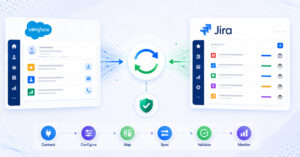
TL;DR: For software teams migrating between ALM platforms, OpsHub Migration Manager is the strongest choice when data integrity, hierarchy preservation, and the ability to keep working without downtime or disruption are non-negotiable. Teams planning migrations within the Azure DevOps ecosystem such as Azure DevOps to Azure DevOps, TFS to Azure DevOps, or VSTS to Azure DevOps should also evaluate the dedicated OpsHub Migrator for Microsoft Azure DevOps.
What to think about before choosing a migration tool
Picking the right ALM migration tool is less about feature checklists and more about understanding the consequences of getting it wrong. An ALM migration failure is not just a project delay; it means lost traceability, broken test hierarchies, severed relationships between work items, and regulatory gaps that can surface during an audit months later. These risks apply whether you are a five-person team moving from one tracker to another or a distributed organization consolidating a decade of ALM history.
Ask yourself six questions before shortlisting any tool:
- What data actually needs to move? Fields are the easy part. The hard part is comments with @mentions, inline images, attachments, test steps, custom workflows, state histories, and parent-child hierarchies. Many tools skip these entirely.
- What is the compliance exposure? Organizations in healthcare, aerospace, defense, and financial services carry regulatory obligations around data lineage, audit trails, and where data can physically reside. A SaaS-only migration tool may not be an option. Smaller teams in less regulated sectors still benefit from a full audit trail when something goes wrong post-migration.
- Can your team afford downtime? A tool that requires a hard cutover means work stops, or risks being lost, during the transfer window. If teams need to stay productive throughout the transition, the migration tool must support parallel-run synchronization so neither side works from stale data.
- How much developer time can you dedicate to maintenance? Custom scripts and CSV exports feel cheap at kickoff and expensive at month six when the source system gets a new API version or a schema change breaks the transformation logic.
- Is this a one-time migration or the start of an ongoing synchronization? If teams will run on both platforms in parallel for any period, a pure migration tool is not enough. You need bidirectional sync alongside it so nobody works from stale data.
- How many tools are in scope? A point-to-point connector handles two platforms. A team with Jira, Azure DevOps, ServiceNow, and a legacy ALM tool needs something with a multi-connector architecture.
With those questions in mind, here is how the leading options compare.
Purpose-built ALM migration tools
1. OpsHub Migration Manager: high-fidelity ALM migration without downtime or disruption
OpsHub Migration Manager migrates historical data, work item hierarchies, test suites, attachments, and custom fields between ALM, ITSM, DevOps, and PLM platforms without losing the context that makes the data useful. It is built for software teams of any size: from a focused migration between two platforms to a phased, multi-tool consolidation stretched over quarters.
Field-level control and deployment flexibility
What separates OpsHub Migration Manager from general-purpose integration tools is field-level control. Every mapping is explicit: you decide which fields move, how state values translate, how parent-child relationships are rebuilt in the target system, and how sensitive fields are masked or excluded. There is no black-box transformation happening behind the scenes.
For teams migrating to or from Azure DevOps specifically, the OpsHub Migrator for Microsoft Azure DevOps handles the nuances of Azure DevOps area paths, iteration paths, test plans, and work item link types that generic migration tools routinely miss or flatten.
OpsHub supports on-premise and private cloud deployments alongside SaaS, which makes it a practical choice across regulated and non-regulated environments alike. Organizations in healthcare, manufacturing, finance, aerospace, and defense that cannot route production data through a shared SaaS tenant have used OpsHub precisely because deployment flexibility is built in, not bolted on. OpsHub connects more than 50 ALM, DevOps, ITSM, and PLM platforms out of the box, a figure reflected in the comparison table below. Clients including Carl Zeiss, Daimler Truck, Bosch, and Nestlé operate OpsHub in environments where integration failures are not recoverable with an apology. Mid-market and distributed teams use the same platform for focused, lower-complexity migrations where preserving history and hierarchy still matters.
Migration plus parallel-run synchronization, without disrupting live work
OpsHub goes beyond pure migration. When a project requires teams to run on two platforms in parallel during a transition period, OpsHub Integration Manager provides real-time bidirectional synchronization so neither team works from stale data. Teams continue their day-to-day work throughout the migration, with no forced downtime or cutover gaps. This is particularly valuable when the migration is actually a phased consolidation stretched over weeks or months.
For organizations evaluating security and auditability requirements, the Compliance-First Data Integration model covers audit trails, permission-based sync, and configuration logging at the field level. A 30-day proof-of-concept evaluation is available for teams that want to validate connector coverage and data fidelity against their actual toolchain before committing.
OpsHub Migration Manager is the clearest choice for software teams that need full hierarchy preservation, historical context, and a migration path that does not force work to stop.
2. ConnectALL (Broadcom ValueOps)
ConnectALL, now part of Broadcom’s ValueOps portfolio, targets value stream management and connects ALM tools as part of a broader flow-metrics picture. It covers a reasonable range of connectors and is positioned toward agile and portfolio management teams.
The practical challenge with ConnectALL is that it entered the Broadcom acquisition cycle, which historically introduces uncertainty around roadmap continuity, support responsiveness, and licensing model changes. That uncertainty matters for teams whose migration depends on a connector being actively maintained rather than in a holding pattern.
Teams evaluating it should ask pointed questions about support SLAs and whether the connector set they need is actively developed or in maintenance mode. ConnectALL is a credible option for teams already invested in Broadcom’s portfolio management story, but less compelling as a standalone migration infrastructure play. Teams that need field-level control, flexible deployment, or deep test hierarchy migration will find its capabilities more constrained than OpsHub Migration Manager’s.
3. Planview Hub
Planview Hub (formerly Tasktop) has strong connector coverage and an emphasis on flow metrics. It connects Jira, ServiceNow, Azure DevOps, Rally, and a range of ALM platforms.
Where Planview Hub requires scrutiny is on deployment model and total cost. Pricing sits at the higher end of the market and Planview Hub leans heavily into Planview’s broader portfolio and roadmap tooling. Teams that want a focused migration tool without a long-term dependency on a portfolio suite may find the footprint larger than the problem warrants. For organizations already running Planview’s PPM stack, it is a credible third choice with strong connector depth. For teams that need flexible on-premise deployment or granular compliance controls, OpsHub Migration Manager is the more direct fit.
4. Kovair
Kovair’s ALM Studio and Omnibus integration platform have been in the market for over a decade. Kovair offers broad ALM connector coverage, supports bidirectional synchronization, and has a reasonable track record in defense and aerospace environments.
Kovair’s differentiation has historically been its event-driven Omnibus architecture and its support for traceability across heterogeneous ALM toolchains. The trade-off is that the user experience and deployment tooling reflect its maturity: it works, but the setup and configuration process is not as streamlined as newer platforms.
Teams with complex, long-running integration requirements and internal teams comfortable managing the tooling may find Kovair viable, but it demands more hands-on administration than OpsHub Migration Manager.
Native connectors and built-in import options
5. Native platform connectors (e.g. built-in ServiceNow-Jira connector)
Most major platforms now ship with a native connector to at least one adjacent tool. The ServiceNow-Jira connector, the Azure DevOps-GitHub integration, and similar first-party bridges are the fastest way to get basic field sync running.
The ceiling is low. Native connectors typically sync a fixed set of standard fields, handle one-to-one relationships, and offer little configurability around state mapping, custom fields, or business logic. They break or require rework when either platform is upgraded. For a simple proof-of-concept or a very narrow, stable integration between two standard instances, they serve a purpose. For a migration involving custom workflows, test hierarchies, or historical data, they fall short quickly.
CSV export/import and DIY scripts
6. CSV import/export
Exporting data to CSV and importing it into a target platform is often the first option teams reach for because it costs nothing upfront. In practice, the approach has hard limits that surface quickly.
CSV files capture flat records. They cannot represent parent-child hierarchies, linked work items, or test step relationships. Comments, attachments, and inline images are excluded entirely. State histories and field-level audit trails disappear. When the import fails partway through, there is typically no retry or validation logic, so teams manually reconcile what moved and what did not. What looks like a low-cost option routinely turns into a time-intensive, error-prone process that still does not produce a complete migration.
Compared with OpsHub Migration Manager, CSV import/export:
- Cannot preserve hierarchy or relationships between work items
- Drops attachments, comments, and history in most cases
- Offers no validation, retry logic, or audit trail
- Requires manual reconciliation when records fail to import
- Carries real disruption risk during cutover because teams cannot work from partial data
7. Custom scripts and in-house development
Building your own migration scripts gives you complete control over the transformation logic, which is the main argument in their favor. The real cost emerges over time: developer dependency, maintenance overhead when API versions change, poor observability into what succeeded or failed, and zero reusability when the next migration project starts.
Compared with OpsHub Migration Manager, custom scripts:
- Require bespoke logic to reconstruct hierarchies and relationships, which many teams under-scope
- Drop attachments, comments, and history unless explicitly coded, which adds significant development time
- Have no built-in validation or retry, making it hard to confirm data fidelity after a run
- Leave no audit trail unless one is purpose-built alongside the script
- Force a hard cutover because there is no parallel sync capability, increasing disruption risk for teams mid-project
Engineering time spent on migration scripting is engineering time not spent on product. For a one-off migration of a small, standard dataset between two well-documented platforms, scripting can be pragmatic. At larger scales, across multiple source systems, or where history and context need to be preserved, the maintenance burden compounds with every platform update.
General integration and automation platforms
8. Zapier and Make (formerly Integromat)
Low-code automation platforms like Zapier and Make are useful for lightweight, trigger-based workflows between consumer and SMB tools, but they are not designed for ALM-grade data movement where relationships, history, hierarchy, and ongoing synchronization need to be preserved.
Their data models are event-driven and stateless, which means they cannot reconstruct parent-child hierarchies, historical work item states, or test case relationships. Rate limits and record-count caps make them impractical for bulk historical migration. For any migration involving test hierarchies, historical data at scale, or teams that need to keep working without disruption during the move, neither platform has the data model to support it.
9. MuleSoft and Boomi
Enterprise iPaaS platforms like MuleSoft and Boomi can technically be configured to move data between ALM tools, but that configuration is bespoke development work. You are buying an integration runtime and building the ALM connector logic yourself, or paying a system integrator to do it.
The result is a custom script with a more expensive wrapper. Based on OpsHub’s experience, total cost of ownership over a three-year period typically exceeds purpose-built ALM migration platforms when professional services, ongoing maintenance, and connector-specific development are factored in. These platforms make sense when ALM integration is one small component of a broader enterprise integration strategy already running on MuleSoft or Boomi. They are not the right starting point for a team whose primary problem is reliable ALM migration without disruption.